A short blogpost this time, with a small but valuable lesson that we learned at Ronimo a couple of years ago.
At some point we figured it would be wise to make two artists make designs for an important character, and then from all the designs they make choose the best. At first glance this looks like a really good idea: two people will come up with a much wider range of designs and the chances of reaching something really good are a lot higher than with one artist.
However, there is a gigantic downside as well: in a sense making this design becomes a competition, and one of the two artists will lose. This can be incredibly demotivating, especially if an artists 'loses' a couple of times in a row.
So we decided to not do this again, and just give a single character to a single artist to design. That artist makes a lot of different designs, everyone can give feedback and in the end we choose from his concepts. We can still have variation and something to choose, but whatever is chosen, it is always a design by the artist working on it, so he never 'loses'.
For this same reason, we also rarely move a task to someone else when a specific artist appears stuck on it. It is often better to struggle a bit, or to let it rest for a week or so, or to get help, then to give the entire topic to someone else and see him find something cool within a day. This feels too much like someone else did a better job, and we don't want that kind of competition in our office. Of course, if someone asks for the task to be moved, then that is totally okay.
I guess some people might excel under competition and stress, but in general, I feel it is a good idea to try to keep any form of 'winning' and 'losing' outside our development process.
(Except when playing games, in which case everything else must give way for the glorious purpose of pwning n00bs.)
Friday, 29 June 2012


Sunday, 24 June 2012
How to really involve a larger team in the creative process
At Ronimo we strongly believe in involving the entire team as much as possible in the creative process of game development. No matter whether someone is a lead, a developer or an intern, everyone's opinion is valuable. This is, however, an incredibly difficult thing to do. In the past months we had 16 people working in our office. That means sixteen different opinions, and even just understanding each of them is already incredibly difficult, especially when it comes to difficult-to-explain graphical concepts. Let alone if you want those 16 people to agree, or to least all feel like their voice has been heard and seriously weighed in.
There are two big problems involved in this, and this blogpost outlines a method that tries to work around both:
-A decision might be made without really taking everyone's opinion into account.
-The process might take endlessly, as everyone has a different opinion and we keep trying to find a middle ground.
So today I would like to talk about the way we do that at Ronimo for our art styles. Since we started on De Blob 6.5 years ago (when we were still in school) we have been in a series of larger game projects and in each project we have learned more about how this works best for us. To keep this blogpost focussed, I am only going to talk about art style development today.
Before I start out, let me first note that this is a very flexible process for us. We don't follow a step-by-step plan and we constantly adapt to what works in the current situation. This blogpost is just my analysis of how this practically pans out for us, and since I think it works quite well, I figured other creative teams might have a use for this information.
Step 0: Communicate visually
This is not really a step in itself, but more a general concept. Describing art styles in words is incredibly difficult and in practice always ends in everyone having a different vision in their minds. So we try to communicate visually as much as possible. We don't do art style meetings or brainstorms without a computer with internet at hand, so that references can always be shown and pointed at. Clear communication is key and visual concepts should be communicated visually.
Step 1: Collect inspiration
We usually already have a rough gameplay concept before we start on the art style, and that means that most people also already have some ideas about how the game should look. So we start by making a topic on our internal forum where everyone just posts inspirational images. Images can come from any source (movies, comics, art, concept art, other games), and may contain just a couple of interesting elements, or be relevant in their entirety. Since posting other people's images does not require any drawing skills, even programmers can easily propose styles here.
Step 2: Create concept art
Our forum topic will quickly contain several dozen images and ideas. From those our artists create a series of completely different designs, trying to take in all the ideas. This should result in wildly different images. The art team tries to also express the ideas that they personally don't like. Everyone's views ought to be represented here somewhere.

(Check this previous blogpost for bigger versions of these images.)
Step 2b: Forum feedback
While the art team is making concept art, they regularly post their results on our internal forum, and everyone can add suggestions for variations and changes.
Step 3: The big feedback meeting
Now that we have around 10 vastly different designs, we do a big meeting with the entire team, around a big screen that shows the images. Since this is a meeting with the entire team, it can easily take several hours. First the art team shows each image and gives some background info on what their ideas were with it. Then we do a round where everyone in turn gets to express their opinions and elect a couple of favourites. Our producer writes down the votes and at the end we discuss the results.
Letting everyone speak in turn here is very important for this meeting: an open discussion with 16 people always has some people constantly talking, and some others who never say anything. Giving everyone a turn gives more equal weight to different personalities.
Step 4: Iterate on the favourites
Usually the meeting has not resulted in a single image that everyone is happy with. So the art team takes the two or three favourites and makes variations on these, taking into account any feedback given during the meeting or on the forum (e.g. "How about style B, but with more colour and with that tough guy from style D"). Again, results are posted and discussed on our internal forum.
Step 5: Make a final choice
Now we do another meeting like in Step 3, only this time with the goal of in the end choosing the final style. First we discuss a bit, then we do a vote where everyone can elect his 2 favourites. The style with the most votes ends up in the game.

(Check this blogpost for more on why this style was cancelled in the end.)
Step 6: Make game!
The process is done and we have a style and theme! Woohoo! The art team can now start working on designing all the different characters, elements and levels in the game, and on trying to get the style working in our engine.
A key thing to understand here, is that this process involves a limited number of meetings with the entire team, and each meeting has a clear goal. Since we usually cannot reach a unanimous decision, voting is used to make sure we never end up without a conclusion. These limitations guard us from iterating endlessly based on all the different (and shifting!) opinions.
With sixteen people in the team, the end result will rarely be a unanimous decision. However, by involving everyone in the team, and by making the art team make designs that incorporate everyone's opinions (even the ones the art team does not actually like themselves) we have a process that really gives everyone a voice and gives even the weirdest ideas a change to flourish.
There are two big problems involved in this, and this blogpost outlines a method that tries to work around both:
-A decision might be made without really taking everyone's opinion into account.
-The process might take endlessly, as everyone has a different opinion and we keep trying to find a middle ground.
So today I would like to talk about the way we do that at Ronimo for our art styles. Since we started on De Blob 6.5 years ago (when we were still in school) we have been in a series of larger game projects and in each project we have learned more about how this works best for us. To keep this blogpost focussed, I am only going to talk about art style development today.
Before I start out, let me first note that this is a very flexible process for us. We don't follow a step-by-step plan and we constantly adapt to what works in the current situation. This blogpost is just my analysis of how this practically pans out for us, and since I think it works quite well, I figured other creative teams might have a use for this information.
Step 0: Communicate visually
This is not really a step in itself, but more a general concept. Describing art styles in words is incredibly difficult and in practice always ends in everyone having a different vision in their minds. So we try to communicate visually as much as possible. We don't do art style meetings or brainstorms without a computer with internet at hand, so that references can always be shown and pointed at. Clear communication is key and visual concepts should be communicated visually.
Step 1: Collect inspiration
We usually already have a rough gameplay concept before we start on the art style, and that means that most people also already have some ideas about how the game should look. So we start by making a topic on our internal forum where everyone just posts inspirational images. Images can come from any source (movies, comics, art, concept art, other games), and may contain just a couple of interesting elements, or be relevant in their entirety. Since posting other people's images does not require any drawing skills, even programmers can easily propose styles here.
Step 2: Create concept art
Our forum topic will quickly contain several dozen images and ideas. From those our artists create a series of completely different designs, trying to take in all the ideas. This should result in wildly different images. The art team tries to also express the ideas that they personally don't like. Everyone's views ought to be represented here somewhere.
(Check this previous blogpost for bigger versions of these images.)
Step 2b: Forum feedback
While the art team is making concept art, they regularly post their results on our internal forum, and everyone can add suggestions for variations and changes.
Step 3: The big feedback meeting
Now that we have around 10 vastly different designs, we do a big meeting with the entire team, around a big screen that shows the images. Since this is a meeting with the entire team, it can easily take several hours. First the art team shows each image and gives some background info on what their ideas were with it. Then we do a round where everyone in turn gets to express their opinions and elect a couple of favourites. Our producer writes down the votes and at the end we discuss the results.
Letting everyone speak in turn here is very important for this meeting: an open discussion with 16 people always has some people constantly talking, and some others who never say anything. Giving everyone a turn gives more equal weight to different personalities.
Step 4: Iterate on the favourites
Usually the meeting has not resulted in a single image that everyone is happy with. So the art team takes the two or three favourites and makes variations on these, taking into account any feedback given during the meeting or on the forum (e.g. "How about style B, but with more colour and with that tough guy from style D"). Again, results are posted and discussed on our internal forum.
Step 5: Make a final choice
Now we do another meeting like in Step 3, only this time with the goal of in the end choosing the final style. First we discuss a bit, then we do a vote where everyone can elect his 2 favourites. The style with the most votes ends up in the game.
(Check this blogpost for more on why this style was cancelled in the end.)
Step 6: Make game!
The process is done and we have a style and theme! Woohoo! The art team can now start working on designing all the different characters, elements and levels in the game, and on trying to get the style working in our engine.
A key thing to understand here, is that this process involves a limited number of meetings with the entire team, and each meeting has a clear goal. Since we usually cannot reach a unanimous decision, voting is used to make sure we never end up without a conclusion. These limitations guard us from iterating endlessly based on all the different (and shifting!) opinions.
With sixteen people in the team, the end result will rarely be a unanimous decision. However, by involving everyone in the team, and by making the art team make designs that incorporate everyone's opinions (even the ones the art team does not actually like themselves) we have a process that really gives everyone a voice and gives even the weirdest ideas a change to flourish.
Sunday, 17 June 2012
The Epic Shoes Of Awesome Winning
I often talk to people about that good indie marketing requires doing all kinds of crazy stuff to get press to talk about your games. The good thing is that such "crazy stuff" usually is the same as just "awesome stuff". So even if a 'stunt' would fail and isn't written about that much, we still end up with awesome swag. I intend to some day write a couple of blogposts about marketing, but in the meanwhile I just can't wait to show the awesomeness I have for you today. I would like to present: The Shoes.
Yes, we have Awesomenauts shoes. Only one pair, but they are just insanely awesome, and custom-made by Kyozokicks. And here's the best part: we are giving them away to someone who likes Awesomenauts on Facebook or who follows RonimoGames on Twitter. So if you are not doing one of these things yet, then please do so now and get a chance at winning The Shoes Of Cool!
These shoes are even cooler than the custom Swords & Soldiers Move controllers we made two years ago. I realize I am saying a lot of "cool" and "awesome" and such here, but I just really love this kind of marketing! ^_^


Yellow shoelaces! YELLOW SHOELACES!
Yes, we have Awesomenauts shoes. Only one pair, but they are just insanely awesome, and custom-made by Kyozokicks. And here's the best part: we are giving them away to someone who likes Awesomenauts on Facebook or who follows RonimoGames on Twitter. So if you are not doing one of these things yet, then please do so now and get a chance at winning The Shoes Of Cool!
These shoes are even cooler than the custom Swords & Soldiers Move controllers we made two years ago. I realize I am saying a lot of "cool" and "awesome" and such here, but I just really love this kind of marketing! ^_^
Yellow shoelaces! YELLOW SHOELACES!
Sunday, 3 June 2012
What Awesomenauts almost looked like
Last week I showed the various styles that our art team concepted for Awesomenauts. But I kept the most important one for this week: the one we actually chose to make! The Purple Style. We chose this one and worked on it for several months! This is what it looked like:

click for high resolution
I still consider this image to be one of the pretties things to come out of Ronimo so far. So just imagine how bad I felt about letting this one go. It was the right choice, though: this purple style is extremely difficult to read. It looks great, but in which teams are those characters? How could we visualise what skills a characters is using, when the colour palette is so limited and the backgrounds so dense?
This style finally got cancelled when, while playing around with the gameplay, it turned out that Awesomenauts was going to be very chaotic. This chaos was part of the fun, but a chaotic game requires a lot of clarity in the art, which is just not possible in the Purple Style. So we switched to something that was inspired by the likes of Earthworm Jim and Ratchet & Clank.
Since we worked on the Purple Style for several months, lots of cool concept art was made for it. Our ideas for the setting were not very clear, but some keywords were "Shangri La" and "eastern".


When we started working on Awesomenauts, we were quite unhappy with Flash and wanted something else. Flash was too difficult to handle for anything but flat shading, and we wanted more details and gradients in our artwork this time. So the idea at first was to create 3D models and render those to textures. This turned out to be too much work, though, so when our former intern Marlies Barends showed us After Effects and how excellent it is for animating detailed 2D art, we switched to that for all our character animation.
However, in the meanwhile I had already been playing around a bit with how to get those 3D models to look good for a 2D game. A couple of years before that I had made a 3D model of Captain August (a webcomic by Roderick Leeuwenhart), so I added some basic animation to that and created a couple of cartoon materials in 3D Studio MAX to see whether that would work. It doesn't look as 2D as I wanted, but it does look quite interesting, I think:
I also tried dropping that guy in the 2D environment art that we had:
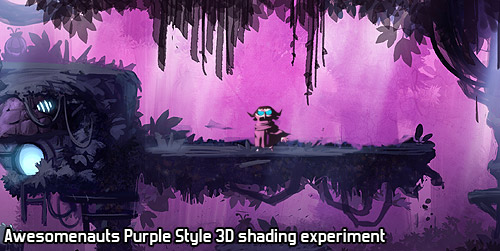
Of course, we didn't just work on the characters, but also on the environments. Since this would play in a forest, our art team wanted to add variation by using the entire height of the forest. So the top of the level would play on top of the trees, showing mountains in the distance, while the bottom of the level would play on the ground, between roots and small streams.


Finally, while looking through our concept art archive, I came across this one, which I had never even seen before! I really like the flowing lines here, so I'll end this post with this great piece of linework:

Next week, I'll explain what process we use at Ronimo to involve all 16 developers in choosing a visual style for our games. It is difficult to involve so many without grinding to a halt in endless discussions and brainstorms with way too many people, but I think by now we have found a pretty good process for this!
click for high resolution
I still consider this image to be one of the pretties things to come out of Ronimo so far. So just imagine how bad I felt about letting this one go. It was the right choice, though: this purple style is extremely difficult to read. It looks great, but in which teams are those characters? How could we visualise what skills a characters is using, when the colour palette is so limited and the backgrounds so dense?
This style finally got cancelled when, while playing around with the gameplay, it turned out that Awesomenauts was going to be very chaotic. This chaos was part of the fun, but a chaotic game requires a lot of clarity in the art, which is just not possible in the Purple Style. So we switched to something that was inspired by the likes of Earthworm Jim and Ratchet & Clank.
Since we worked on the Purple Style for several months, lots of cool concept art was made for it. Our ideas for the setting were not very clear, but some keywords were "Shangri La" and "eastern".
When we started working on Awesomenauts, we were quite unhappy with Flash and wanted something else. Flash was too difficult to handle for anything but flat shading, and we wanted more details and gradients in our artwork this time. So the idea at first was to create 3D models and render those to textures. This turned out to be too much work, though, so when our former intern Marlies Barends showed us After Effects and how excellent it is for animating detailed 2D art, we switched to that for all our character animation.
However, in the meanwhile I had already been playing around a bit with how to get those 3D models to look good for a 2D game. A couple of years before that I had made a 3D model of Captain August (a webcomic by Roderick Leeuwenhart), so I added some basic animation to that and created a couple of cartoon materials in 3D Studio MAX to see whether that would work. It doesn't look as 2D as I wanted, but it does look quite interesting, I think:
I also tried dropping that guy in the 2D environment art that we had:
Of course, we didn't just work on the characters, but also on the environments. Since this would play in a forest, our art team wanted to add variation by using the entire height of the forest. So the top of the level would play on top of the trees, showing mountains in the distance, while the bottom of the level would play on the ground, between roots and small streams.
Finally, while looking through our concept art archive, I came across this one, which I had never even seen before! I really like the flowing lines here, so I'll end this post with this great piece of linework:
Next week, I'll explain what process we use at Ronimo to involve all 16 developers in choosing a visual style for our games. It is difficult to involve so many without grinding to a halt in endless discussions and brainstorms with way too many people, but I think by now we have found a pretty good process for this!
Sunday, 27 May 2012
The beautiful alternative Awesomenauts art styles
Last week I showed the concept art that our art team made once we had settled on the final style for Awesomenauts. However, to get there we always go through a period of exploration, where our art team tries out various things.
Our games usually start with a gameplay concept, and once we have settled on what that is, we start looking for a world and visual style that fits this. This is a process I can personally take no credit for: our art team starts drawing cool stuff, and all I do as a programmer is give ideas and feedback. Obviously all the awesomeness comes from our art team here, and I am really honoured to work with people who draw such cool stuff! This period is a lot of fun, because they somehow always manage to surprise me with better and more interesting things than I had imagined myself. This was definitely the case for Awesomenauts, and even more so on the secret concept work that has happened more recently.
Finding a visual style is quite a complex process, since Ronimo is currently 16 people and we think it is really important to make sure everyone is involved and heard. That's difficult with such a large team, so I will talk about our process for that in a couple of weeks.
Now without further ado, here are the styles that came out of our art team's style exploration for Awesomenauts!

click for large version


Obviously, this one is pretty much a Starcraft parody. I have no idea how serious this one was to our art team, but that space-marine-cowboy is just too crazy to be true! :D

These next two focus purely on what the heroes could have looked like:


The next batch took quite a bit of inspiration from Portal's white laboratories:

click for large version


This one is actually a good excuse to talk about the gameplay at this point a bit. This is a lot earlier in development than the images I posted last week, and the game was really different then. Back than we had the idea that DotA was too hardcore, and that some people would really enjoy contributing to a DotA match, without fighting other players all the time. So in this phase the game featured really large levels with single player quests that the player could do to level help his team in combat
For example, in some of the ideas it was possible to collect mechanical parts by exploring a large platforming world. These parts could then be used to build turrets, droid factories and to craft weapons for the heroes. We never actually prototyped most of these mechanics, since we already started simplifying the game before they were actually implemented. You can see a bit of that in the image above, though: the walker in the top right could be built to patrol an area, and the turret at the centre could be manned by a player for superior fire power.
I am really happy that we threw away most of these complex mechanics: without them the game is very complex already, and it also has plenty of tactical depth as it is. These mechanics would mainly just have made the game overly complicated, very probably not more fun.

click for large version
This final one above was in a kind of biodome environment. We had lots of gameplay ideas for the dome, but I cannot remember a single one of those now. I guess the ideas weren't interesting enough to stick... ;)
Which of these styles do you like best? My personal favourite here is definitely A, but there are several more that I would have loved to have turned into an actual game. Owwww, the endless agony of throwing away cool stuff because it is impossible to make everything!
In the end, none of these styles were chosen for the game. However, the style that we ended up releasing the game with was also not chosen at this point! There was one more style here, and we went for that one: the Purple Style. In the end the Purple Style got cancelled as well and we went for what you all know from the final game. Although the Purple Style ended up really not being suitable, I still think it is one of the prettiest things ever to come out of Ronimo. Next week I will reveal this Purple Style that we worked on for months and then threw away!
Our games usually start with a gameplay concept, and once we have settled on what that is, we start looking for a world and visual style that fits this. This is a process I can personally take no credit for: our art team starts drawing cool stuff, and all I do as a programmer is give ideas and feedback. Obviously all the awesomeness comes from our art team here, and I am really honoured to work with people who draw such cool stuff! This period is a lot of fun, because they somehow always manage to surprise me with better and more interesting things than I had imagined myself. This was definitely the case for Awesomenauts, and even more so on the secret concept work that has happened more recently.
Finding a visual style is quite a complex process, since Ronimo is currently 16 people and we think it is really important to make sure everyone is involved and heard. That's difficult with such a large team, so I will talk about our process for that in a couple of weeks.
Now without further ado, here are the styles that came out of our art team's style exploration for Awesomenauts!
click for large version
Obviously, this one is pretty much a Starcraft parody. I have no idea how serious this one was to our art team, but that space-marine-cowboy is just too crazy to be true! :D
These next two focus purely on what the heroes could have looked like:
The next batch took quite a bit of inspiration from Portal's white laboratories:
click for large version
This one is actually a good excuse to talk about the gameplay at this point a bit. This is a lot earlier in development than the images I posted last week, and the game was really different then. Back than we had the idea that DotA was too hardcore, and that some people would really enjoy contributing to a DotA match, without fighting other players all the time. So in this phase the game featured really large levels with single player quests that the player could do to level help his team in combat
For example, in some of the ideas it was possible to collect mechanical parts by exploring a large platforming world. These parts could then be used to build turrets, droid factories and to craft weapons for the heroes. We never actually prototyped most of these mechanics, since we already started simplifying the game before they were actually implemented. You can see a bit of that in the image above, though: the walker in the top right could be built to patrol an area, and the turret at the centre could be manned by a player for superior fire power.
I am really happy that we threw away most of these complex mechanics: without them the game is very complex already, and it also has plenty of tactical depth as it is. These mechanics would mainly just have made the game overly complicated, very probably not more fun.
click for large version
This final one above was in a kind of biodome environment. We had lots of gameplay ideas for the dome, but I cannot remember a single one of those now. I guess the ideas weren't interesting enough to stick... ;)
Which of these styles do you like best? My personal favourite here is definitely A, but there are several more that I would have loved to have turned into an actual game. Owwww, the endless agony of throwing away cool stuff because it is impossible to make everything!
In the end, none of these styles were chosen for the game. However, the style that we ended up releasing the game with was also not chosen at this point! There was one more style here, and we went for that one: the Purple Style. In the end the Purple Style got cancelled as well and we went for what you all know from the final game. Although the Purple Style ended up really not being suitable, I still think it is one of the prettiest things ever to come out of Ronimo. Next week I will reveal this Purple Style that we worked on for months and then threw away!
Saturday, 19 May 2012
Awesomenauts early concept art
Our art team made some great concept art for Awesomenauts, and now that the game is out, I can finally show a bit of how we envisioned it two years ago. Lots of things changed since then, so I will also give some fun notes on how we saw the game at that point. Let's start with the most noticeable change:

At Ronimo we strongly believe that for a large part, concept art should look like the actual game. So when drawing a car for a racing game, the back of that car is actually its most important part, since that is what the player will see 95% of the time. Since we make 2D games, we can take this to the extreme: some of our concept art can easily be mistaken for screenshots. In fact, for Swords & Soldiers, many reviewers actually included early concept art in their reviews, thinking it was a screenshot from the final game.

For Awesomenauts, our art team made three of these concept art shots that essentially look like fake screenshots from the final game. This helped us see what we needed for our graphics style. It is also a great way to show to publishers what the game would look like in the end.
Here are the three fake screenshots that our art team made, plus a bunch of notes on remarkable things that changed since this concept art was made:


For a quick comparison, below is a screenshot from the final game. Note especially how the camera is zoomed out a lot, and the level art does not have as much contrast as in the concept art shots. In a chaotic game like Awesomenauts, readability is key, so our art team toned down the levels quite a bit to make the characters and bullets stand out more.

I hope you enjoyed seeing a bit of how the game evolved over the years! :) For more screenshots of the final version of the game, please visit the Awesomenauts website.
At Ronimo we strongly believe that for a large part, concept art should look like the actual game. So when drawing a car for a racing game, the back of that car is actually its most important part, since that is what the player will see 95% of the time. Since we make 2D games, we can take this to the extreme: some of our concept art can easily be mistaken for screenshots. In fact, for Swords & Soldiers, many reviewers actually included early concept art in their reviews, thinking it was a screenshot from the final game.
For Awesomenauts, our art team made three of these concept art shots that essentially look like fake screenshots from the final game. This helped us see what we needed for our graphics style. It is also a great way to show to publishers what the game would look like in the end.
Here are the three fake screenshots that our art team made, plus a bunch of notes on remarkable things that changed since this concept art was made:
- As can be seen above, early versions of Froggy G looked like Samuel L. Jackson in Pulp Fiction. At some point, his afro was not deemed cool enough by our art team and was removed. After a lot of protest from other team members (including me), the afro came back. However, the game design required the camera to be zoomed out a lot more, and this required some more changes to his looks. Many of the details in his face were removed to keep the art readable on a much smaller size.
- Lots of weapons and skills changed during development. At some point, all hero's even had both a melee attack and a ranged attack. When the concept art above was drawn, Froggy G's main weapon was a lightning chainsaw. Later this changed to his famous gun-that-looks-like-a-fish.
- The big robot at the bottom right was a tower. For a long time during development, towers could move around to patrol a small part of the level. Players could also unleash them to help during an attack. However, this design was too complex and resulted in gameplay issues with backdooring (moving beyond a tower to skip part of the level), so towers later became more like a static wall.
- Originally, the shop was a vending machine with arms and legs, as can be seen above. In the final game, the healing area and the shop have been merged and the shop is not a character anymore. The vending machine concept remained, though.
- Initially we were going to make only one level, so to keep screenshots varied, we added a lot of variety to this single level: jungle, purple caves, space station elements. In the end we decided to make two more levels, allowing those two levels to be more focussed on a single unique type of environment. Since the Ribbit IV map was originally meant to be the only level, you can still see in the final game that it has more variety than the other two maps.
- As a remnant of an art style for Awesomenauts that we cancelled really early in development, the level had some purple areas, as can be seen in the concept art image above. Later our art team made these areas more brownish. If I remember correctly, this was to make the gameplay stand out better against the background. I was personally really bummed by this, because I liked the purple areas a lot. However, I guess our art team was correct about the readability and made the right choice. :)
- The object that needed to be destroyed to win the match varied a lot during development. In the end, we settled on the Solar Drill that can be seen in the final game. However, when these fake screenshots were drawn, the end goal was to destroy the big spaceship that can be seen on the left of this screenshot. A much bigger spaceship later ended up in the game as the place from which the player is launched onto the battlefield. At some earlier point, the end goal of a match was even to destroy a big multi-stage boss that you had to fight as a team! Obviously, having lots of heroes around during that boss fight created utter chaos, and thus the boss was removed.
For a quick comparison, below is a screenshot from the final game. Note especially how the camera is zoomed out a lot, and the level art does not have as much contrast as in the concept art shots. In a chaotic game like Awesomenauts, readability is key, so our art team toned down the levels quite a bit to make the characters and bullets stand out more.
I hope you enjoyed seeing a bit of how the game evolved over the years! :) For more screenshots of the final version of the game, please visit the Awesomenauts website.
Saturday, 12 May 2012
Programming with pasta
Today brings the finale to this epic series of two posts on the many connections between Italian eating habits and creating games. Whereas last week I discussed how lasagne influences game design in a good way, today I will talk about all kinds of Italian food. I will explain why programmers should not only fear the dreaded spaghetti, but also the less-known evil of lasagne. And how about pizza and ravioli? What can they learn us about the art of code?
Note that I realise that the food metaphors might be slightly lame, but the point of this post is that I think it is important to think about the implications of various structures and methods of programming, and this blogpost is basically just an analysis of some pitfalls and approaches.
Most programmers know the term spaghetti code. It refers to a larger code base that is so intertwined, that is it impossible to know how the rest of the code reacts when you change something somewhere. Every line of code might be referencing almost any variable anywhere and maintaining the code becomes all but impossible, because the risk of introducing bugs elsewhere is too great.
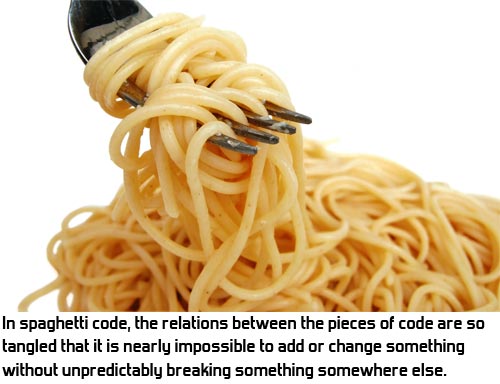
The common solution to spaghetti code is also well known: object oriented programming. By using classes and making them as self-contained as possible, you can make sure that as long as the class behaves the same to the outside world, it doesn't matter if you change how it works internally. Each class is a world of its own. Of course, in practice this is more an ideal than reality, because during development classes often also need to change how they behave towards the outside world. Still, object oriented programming can help a lot to separate large code bases into smaller, more maintainable chunks.
However, there is also the other end of the spectrum. Object oriented programming can be taken too far. Let's have a look at an example from a real part of Awesomenauts. In Awesomenauts, when the player dies, the music fades out and decreases in pitch. The real situation is a bit more complex, but to keep this post readable, I'm simplifying it a bit. An intern was to implement the logic for the music. So he came up with something like this set of classes:

However, due to his internship ending, he didn't finish this set of code and I had to complete it. Problem is, that these are so many classes for such a simple task, that I almost got lost in all all the class management code and could hardly make any sense of what was working and what was not. Because the problem was so simple, I decided to just throw away his code altogether and write one simple class instead. It looks like this (again, simplified for clarity):

As you can see, this is actually really simple and understandable. No need for all these classes here. It became a little bit more complicated when shuffle and killing spree music were added, but still, the MusicManager class is short and understandable.
So what the intern did, is an example of lasagne coding: too many layers. Especially programmers who are relatively new to object oriented programming often overreact to its benefits by creating way too many classes. I belive there is something like an ideal class size. This varies per class, but I think in general classes above 500 lines are almost always too long, causing spaghetti within the class, while classes beneath 50 lines are quite often too small and thus part of lasagne. Not always of course: some classes are perfectly fine for doing one clear thing in a small number of lines.

Lasagne coding is of course a common term, but I recently discovered that few programmers are aware of this name. Most coders I meet do know that having too many classes is a bad thing, of course, but I think it helps communication and thinking to also have terms for good and bad practices.
To finish this post, I'd like to mention two more food metaphors. Pizza code and ravioli code. Unlike spaghetti code and lasagne code, these are terms I just made up on the spot because I like to talk about food. The concepts are real, though.
When programming large projects, interrelations between classes often become more and more complex. Awesomenauts has around 1,200 classes, which to me is quite a lot. Even if all of those classes are proper self-contained units, adding or changing things can still become very complex, as any number of classes might be using any number of other classes. If care is not taken, the class diagram starts to look like a pizza: a big plate of dough with all kinds of stuff randomly thrown on it and no idea what goes where or why. All the classes just happen to be there.

So to make the class diagram more manageable, I think it is better to make it resemble ravioli. Ravioli are little dough wraps with good stuff in them. They are closed off and you put the entire thing in your mouth at once and it tastes good. I'd like my code to be like that. Groups of classes work together, but can be represented to the rest of the code base as a whole. Not all of them need to even be usable outside the group at all.

The nicest example of this in Awesomenauts is the input system. This consists of some two dozen classes that together handle input from devices like WiiMotes, keyboards, mice and Xbox 360 controllers. It also handles this for five different platforms (Playstation 3, Xbox 360, Wii, PC, Mac). To the outside, however, only one of the twenty classes is accessible: the InputManager class. All other code that wants to know whether a button is pressed on some device just asks this to simple functions like InputManager::getIsMouseButtonDown(). InputManager is the dough and the two dozen classes that actually handle the hardware on all the various platforms are hidden inside the ravioli ball. If all those 1,200 classes in Awesomenauts were this clearly grouped, you would get a much more manageable 50 groups to understand the relations between, instead of 1,200 separate classes.
This concludes my food series for now. Of course, none of the concepts above are revolutionary, but I think it is really important for any programmer to think about what he thinks is good programming and what is not. In my opinion programmers who never stop coding to take some time to think about whether what they used was a good or a bad method, will never become really good. This post just outlines some of my own thoughts on the matter, and I hope they help you define Good Code (tm) for yourself.
Note that I realise that the food metaphors might be slightly lame, but the point of this post is that I think it is important to think about the implications of various structures and methods of programming, and this blogpost is basically just an analysis of some pitfalls and approaches.
Most programmers know the term spaghetti code. It refers to a larger code base that is so intertwined, that is it impossible to know how the rest of the code reacts when you change something somewhere. Every line of code might be referencing almost any variable anywhere and maintaining the code becomes all but impossible, because the risk of introducing bugs elsewhere is too great.
The common solution to spaghetti code is also well known: object oriented programming. By using classes and making them as self-contained as possible, you can make sure that as long as the class behaves the same to the outside world, it doesn't matter if you change how it works internally. Each class is a world of its own. Of course, in practice this is more an ideal than reality, because during development classes often also need to change how they behave towards the outside world. Still, object oriented programming can help a lot to separate large code bases into smaller, more maintainable chunks.
However, there is also the other end of the spectrum. Object oriented programming can be taken too far. Let's have a look at an example from a real part of Awesomenauts. In Awesomenauts, when the player dies, the music fades out and decreases in pitch. The real situation is a bit more complex, but to keep this post readable, I'm simplifying it a bit. An intern was to implement the logic for the music. So he came up with something like this set of classes:
However, due to his internship ending, he didn't finish this set of code and I had to complete it. Problem is, that these are so many classes for such a simple task, that I almost got lost in all all the class management code and could hardly make any sense of what was working and what was not. Because the problem was so simple, I decided to just throw away his code altogether and write one simple class instead. It looks like this (again, simplified for clarity):
As you can see, this is actually really simple and understandable. No need for all these classes here. It became a little bit more complicated when shuffle and killing spree music were added, but still, the MusicManager class is short and understandable.
So what the intern did, is an example of lasagne coding: too many layers. Especially programmers who are relatively new to object oriented programming often overreact to its benefits by creating way too many classes. I belive there is something like an ideal class size. This varies per class, but I think in general classes above 500 lines are almost always too long, causing spaghetti within the class, while classes beneath 50 lines are quite often too small and thus part of lasagne. Not always of course: some classes are perfectly fine for doing one clear thing in a small number of lines.
Lasagne coding is of course a common term, but I recently discovered that few programmers are aware of this name. Most coders I meet do know that having too many classes is a bad thing, of course, but I think it helps communication and thinking to also have terms for good and bad practices.
To finish this post, I'd like to mention two more food metaphors. Pizza code and ravioli code. Unlike spaghetti code and lasagne code, these are terms I just made up on the spot because I like to talk about food. The concepts are real, though.
When programming large projects, interrelations between classes often become more and more complex. Awesomenauts has around 1,200 classes, which to me is quite a lot. Even if all of those classes are proper self-contained units, adding or changing things can still become very complex, as any number of classes might be using any number of other classes. If care is not taken, the class diagram starts to look like a pizza: a big plate of dough with all kinds of stuff randomly thrown on it and no idea what goes where or why. All the classes just happen to be there.
So to make the class diagram more manageable, I think it is better to make it resemble ravioli. Ravioli are little dough wraps with good stuff in them. They are closed off and you put the entire thing in your mouth at once and it tastes good. I'd like my code to be like that. Groups of classes work together, but can be represented to the rest of the code base as a whole. Not all of them need to even be usable outside the group at all.
The nicest example of this in Awesomenauts is the input system. This consists of some two dozen classes that together handle input from devices like WiiMotes, keyboards, mice and Xbox 360 controllers. It also handles this for five different platforms (Playstation 3, Xbox 360, Wii, PC, Mac). To the outside, however, only one of the twenty classes is accessible: the InputManager class. All other code that wants to know whether a button is pressed on some device just asks this to simple functions like InputManager::getIsMouseButtonDown(). InputManager is the dough and the two dozen classes that actually handle the hardware on all the various platforms are hidden inside the ravioli ball. If all those 1,200 classes in Awesomenauts were this clearly grouped, you would get a much more manageable 50 groups to understand the relations between, instead of 1,200 separate classes.
This concludes my food series for now. Of course, none of the concepts above are revolutionary, but I think it is really important for any programmer to think about what he thinks is good programming and what is not. In my opinion programmers who never stop coding to take some time to think about whether what they used was a good or a bad method, will never become really good. This post just outlines some of my own thoughts on the matter, and I hope they help you define Good Code (tm) for yourself.
Subscribe to:
Posts (Atom)