Showing posts with label Robo Maestro. Show all posts

Wednesday, 24 November 2021

Neat tricks for modelling the Robo Maestro robot

Today I'd like to share some fun, slightly unconventional techniques I used to make the Robo Maestro robot in Blender. I wanted shapes that are both smoothly curved and tight industrial. Hard surface modelling! I think it turned out well, so let's have a look at how it was made!
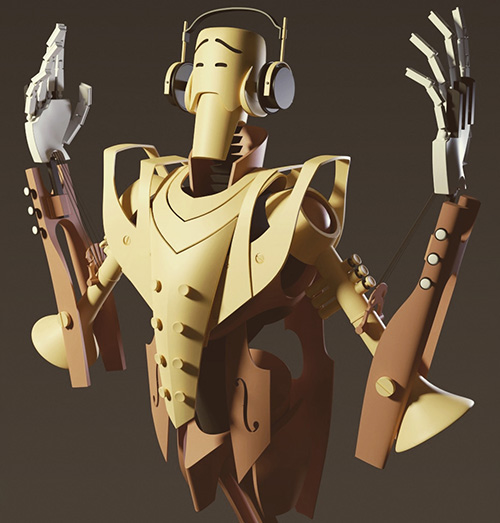
The concept art I was going by is this rough sketch by Robin Keijzer, creator of the awesome point and click adventure Space Rescue (available on Steam, NSFW!). As you can see, all shapes are a combination of curves, straight lines and hard edges.

Subdivision modelling is a great way of making these kinds of curves, but it's a bit cumbersome when you need hard edges and corners as well. The tip you usually see for getting hard edges is to add supporting geometry: extra vertices around hard edges.

However, the more vertices you have, the harder it is to change the shapes: the model becomes unwieldy. Also, the fewer vertices, the smoother the curves you get. So I really really wanted to have as few vertices in the base model as possible for the best smooth curves.
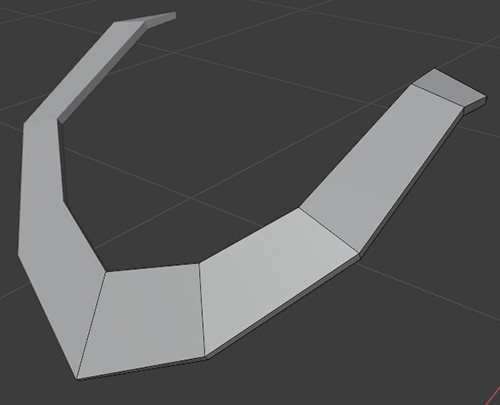
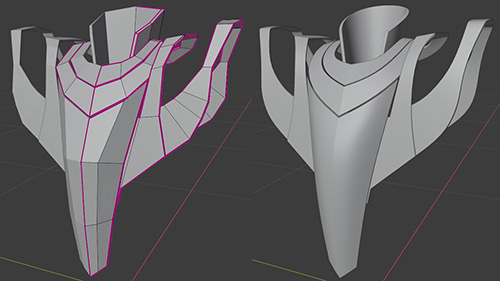
Here Blender comes to the rescue! It has a wonderful feature called "creases" that lets you mark edges that should not be smoothed by the subdivision modifier. This lets us combine hard edges and smooth curves with very few vertices in the base mesh. Very cool, very handy!

Here you can see just how few polygons the base mesh for the Robo Maestro has, and how smooth the curves are that that results in.
However, 100% hard edges feels cheap and fake 3D. For high quality models, we want to slightly bevel the hard edges. Luckily, Blender can also provide this: we can simply add a Bevel modifier to do this automatically.
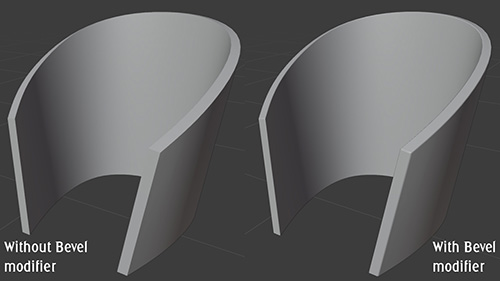
The bevel modifier by default is either one hard edge (still not perfect) or more edges. Adding more edges makes Auto Smooth kick in, which makes us lose a lot of the tightness. The "harden normals" option fixes this (by not using interpolated normals on the bevel edge).
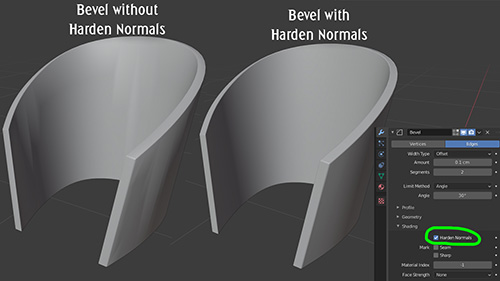
The bevel modifier automatically looks for edges to smooth, but sometimes it gets it wrong. In such cases switch the "limit method" to "weight". Now we can mark edges that need a bevel in our base mesh, and we can even mark per edge how wide the bevel should be. Neat!
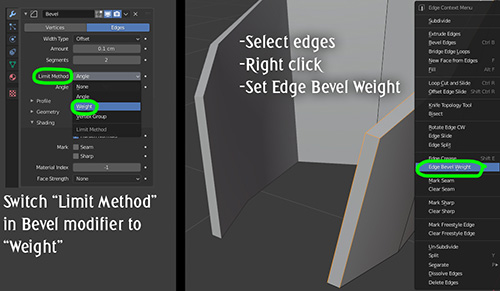
Being able to mark edges and vertices with special features that are used elsewhere is one of my favourite features in Blender. Besides "crease" (for subdivisions) and "bevel weight" there's also "seam" (for automatic UV mapping) and "sharp" (for smooth shading).

Combining these techniques I was able to create the Robo Maestro pretty quickly and still remain flexible until the last stages of modelling: Robin had some feedback on the shapes and I was able to change them very quickly because the base meshes have so few vertices.

Finally, if you were wondering what this model is for: Robo Maestro is a procedural music toy that I'm developing for Steam. He even plays the actual notes with his fingers! Here's a little trailer that shows the concept. Wishlist Robo Maestro now on Steam!

Robo Maestro is coming to Steam!

Play with music like never before! Robo Maestro is the 'game' I'm currently working on and it's a procedural music toy. Guide an endless stream of new music or make detailed tweaks in Editor Mode. Create songs, be inspired and share your creations. Robo Maestro is coming to Steam, add it to your wishlist here!

Robo Maestro is a revolutionary new way of creating and experiencing music. You tell it what you want, and then the Maestro automatically generates music that fits that. Playing Robo Maestro requires no music knowledge at all: just have fun and hear what happens! Guide the Maestro and create awesome music together with it!

Sunday, 26 August 2018

Here's how I made my computer write music

One of my current hobby projects is creating a procedural music system: a computer program that composes and performs music all by itself. It's still a work-in-progress in its early stages, but some recent improvements have gotten it to produce quite interesting music already, so I figured it's about time I share some of my thoughts around how it works. Let's start with a little video that lets you hear the amount of variation it can currently do:


Note that this video contains a selection of the nicer pieces, so it isn't all this good. Most of the other music it currently produces is a bit more boring, or too similar to these fragments. The program is a work-in-progress and it should improve a lot as I spend more time on it.

I started programming this for a rather odd reason: I wanted to practice improvising on my cello over complex chord schemes and figured a program that automatically produces those would do the trick. As usual with this kind of thing, it got out of hand and I've so far spent my time making it cooler instead of playing along to its tunes on my cello. I hope I can expand it to the point where it can be a game soundtrack, or a live streaming radio channel on Youtube that constantly produces new music.

My approach to procedural music is mostly based on my own ideas about composition. I'm deliberately steering away from a lot of common composition 'rules' since I expect that's been done already. I think I'll get something more interesting and more personal if I start from my own ideas instead. While I don't ignore music theory either, I do try to avoid rules like ending a chord progression with the dominant and then going back to the tonic or anything like that.

Just to be clear: my music generator is not an AI or a self-learning system or anything like that.

The procedural music generator consists of a bunch of elements that together produce the music:

Chords, rhythms and scales
To 'teach' my program basic music theory I've created a bunch of text files that define a lot of common and less common chords, rhythms and scales. You can see which it's using in the video: it might for example choose to play a C major chord in 3/4 rhythm.


Structure generators
The first thing needed to create a piece of music, is a basic structure. This part of the program randomly chooses the chord progression, the rhythm and the scales. It also chooses how individual instruments are allowed to deviate from the rhythm, so that there's some consistency between instruments without requiring them to do the exact same thing.

Instrument layer generators
These generate the notes for specific instruments. Each category of instruments has a role to fulfil and its own specific algorithm for that. For example, the generator for drums is completely different from the generator for bass. Most of these generators are still very basic so there's plenty of room for improvement there. A lot of the variation in the video above comes from having different combinations of instrument layer generators. For example, some have drums, others do not. I expect that having a lot of layer generators is where my procedural music will get most of its variation. Currently I have five, but I'd like to create at least a dozen. The most important missing layer at the moment is one for actual melodies, which is probably also the most challenging one to get right.

VST instruments
Actually performing the music is done using VST instruments. VST is a standard for digital instruments that is used by a lot of programs on Windows. A VST file is basically just a DLL and I've coded a simple music player that can handle them. For each instrument layer I'd like to have several VST instruments that can play that layer, so that I can get different sounds. Currently most of it sounds very digital, so it would be nice to also have VSTs for other types of instruments, like acoustic drums and guitars.

Song structure
This is an element that's currently completely missing: at the moment all music played by my music generator is simply a loop of 4 to 12 bars. I want to program systems for song structures with verse/chorus/bridge, but also for endlessly progressing music and for music that for example slowly builds up to a climax.

Carefully restricted randomness
All the systems in this generator contain a lot of randomness, but the randomness is limited to specific rules I've come up with. If those rules are too free then the result is noise, not music, while if the rules are too strict then the resulting music will always seem same, so carefully balancing the randomness is a big challenge here.


For future improvements I'd like to add more instrument layers and refine the current ones, add song structures and add more VST instruments. Since I've recently become a dad I don't have a whole lot of time to work on this, so I expect progress will be very slow. I hope to include a first basic version of my procedural music generator as a bonus feature in the home edition of Cello Fortress, whenever that's actually finished.

Let's conclude with a question: do you know any communities for open source or free VSTs? There are plenty of VSTs that can be downloaded for free, but in many cases they just specify that they're free to use, not free to distribute with commercial software. I've so far had a hard time finding usable instruments or getting into contact with (hobby) instrument programmers who might be willing to allow me to include their instruments. Leave a comment if you've got suggestions or are a digital instrument programmer yourself.