Showing posts with label bugs. Show all posts

Sunday, 9 August 2020

Three nasty netcode bugs we fixed around Blightbound's launch

In the weeks before and after the Early Access launch of our new game Blightbound we've been fixing a lot of bugs, including 3 very stubborn netcode bugs. They weren't any fun while we were looking for them for days, but now that we've found and fixed these they're actually quite intriguing. So today I'd like to share 3 of the more interesting bugs I've seen in the past few years.
While these bugs mostly say something about issues in our code, I think they're also nice examples of how complex low level netcode is, and how easy it is to make a mistake that's overlooked for years, until a specific circumstance makes it come to the surface. All three of these bugs were also in the code of our previous game Awesomenauts, but none of them actually occurred there due to the different circumstances of an Awesomenauts match compared to a Blightbound party.

The one thing all three of these bugs have in common is that they were very hard to reproduce. While they happened often enough to be game-breaking, they rarely happened in testing. This made them very hard to find. For the first two we found a way to reproduce them after a lot of experimenting, while for the final one we never got it ourselves until we had figured out the solution and knew exactly how to trigger it. Finding that one without being able to see it was some solid detective work by my colleague Maarten.

Endless loading screens number 1


This bug occasionally caused clients to get stuck in the loading screen forever. After adding additional logging we saw that the client never received the HostReady message. This is a message that the host sends to the clients to let them know that loading is done and they should get into the game. The client was forever waiting for that HostReady message. Upon further investigation it turned out that the host did actually send the message, but the client received it and then threw it away as irrelevant. Why was that? 

To answer that question, I need to give some background information. An issue with the internet is that it's highly unreliable. Packets can be lost altogether and they can also come in out-of-order or come in very late. One odd situation this can cause, is that a message from a previous level can come in once you're already in the next level, especially if loading times are very low. Applying a message from the previous level to the next level can cause all kinds of weird situations, so we need to recognise such an outdated message and throw it away. We do this with a simple level ID that tells us which level the message belongs to. If we get a message with the wrong level ID, we discard it.

That's simple enough, but we saw that both client and host were in the loading screen for the next level. Why then would the client discard the HostReady message as being from the wrong level? The reason turned out to be in our packet ordering system. Some messages we want to process in the order in which they are sent. So if one message goes missing, we store the ones after it and don't process them until the previous missing one is received and handled.

The bug turned out to be in that specific piece of code: the stored messages didn't store their level ID. Instead, when they were released, we used the level ID for the message that had just come in. This went wrong when a message from the previous level went missing and came in a second or two too late. By that time the HostReady message had already been received, but had been stored since it needed to be processed in order. Since the level ID from the previous room was used for all out-of-order messages, the HostReady message was processed as if it came from the previous room. Thus it was discarded.

I imagine reading this might be mightily confusing, so hopefully this scheme helps explain what went wrong:

Once we had figured this out, the fix was simple enough: store the level ID with each message that is stored for later processing, so that we know the correct level ID  when we get to it.

Endless loading screens number 2

The second loading screen bug we had around that time had a similar cause, but in a different way. When a client is done loading, it tells the host so in a ClientReady message. The host needs to wait for that. Similar to the bug I described above, the ClientReady message was received but discarded because it was from the wrong level. The cause however was a different one.

Sometimes the client starts loading before the host, for whatever reason. Since loading times between levels are very quick in Blightbound, the client can be done loading before the host starts loading. Once the client is done loading, it sends the ClientReady message. However, if the host isn't loading yet and is still in the previous room, then it discards the ClientReady message because it's from the wrong room. A moment later the host starts loading and when it's done loading, it starts waiting for the ClientReady message. Which never comes because it was already received (and discarded).

Here too the solution was pretty straightforward. We first changed the level ID to be incremental (instead of random) so that we can see in the level ID whether an incorrect message is from the next or the previous room. If it's from the previous room, we still discard the message. But if the message is from the next room, we store the message until we have also progressed to that room, and then process it.

The big desync stink


The final netcode bug I'd like to discuss today is rather painful, because unlike the others it still existed at launch. In fact, we didn't even know about it until a day after release. Once we knew it existed it still took us days to find it. In the end this one was fixed in update 0.1.2, six days after launch.

So, what was the bug? What players reported to us was that randomly occasionally the connection would be lost. In itself this is something that can happen: the internet is a highly unreliable place. However, it happened way too often, but never when we tried to reproduce it, not even with simulated extremely bad connections. Also, we have code that recognises connection problems, but this bug didn't trigger that code, so the game thought it was still connected and kept playing, with very odd results.

After a few days a pattern started to emerge: many players reported that this always happened once they had notoriety 3 or 4, when a legendary item was attainable. We didn't think that the bug was actually linked to notoriety or legendary items, because these are quite unrelated to netcode. Instead, we suspected something else: maybe the bug happened after playing together for a certain amount of time.

With this hypothesis in hand we started looking for anything where time matters. Maybe a memory leak that grew over time? Or, more likely: maybe some counter that looped incorrectly? As I described in the above issues, netcode can have many types of counters. I already described the level ID counter and the counter for knowing whether a message is received in-order. There are others as well.

The thing with data that is sent over the netwerk is that it needs to be very efficient. We don't want to send any bytes more than necessary. So whenever we send a counter, we use as few bits as possible. Why send a 32 bit number when 16 bits will do? However, when using smaller numbers they will overflow more quickly. For example, a 16 bit number can store values up to 65,535. Once we go beyond that, it loops back to 0.

Often looping back to 0 isn't a problem: the last time we received the lower packets is so long ago that we won't have to expect any overlap with the last time we used number 0. However, we do need to handle the looping numbers correctly and not blindly throw away number 0 because it's lower than number 65,535.

And this indeed turned out to be the problem. One of the counters we used was a 16 bit number and after about one hour it looped back. In that particular spot we had forgotten to include code to handle that situation. The result is that from there on the game received all messages but discarded them without applying them. Like in the cases above, the solution was simple enough to implement once we knew what the problem was.

One question remains: why wasn't this a problem in Awesomenauts? For starters, Awesomenauts matches are shorter and the connection is reset after a match. So the counter never reaches 65,535. In Blightbound however the connection is kept up in between dungeon runs, so if players keep playing together the number will go out of bounds. But there's more: if the bug would have happened in Awesomenauts, the game would have thought it was a disconnect and would have reconnected, resetting the counter in the process. In Blightbound we determine connection problems in a different way, causing the connection to not be reset in this particular case.


A lesson relearned


Netcode being hard is not new to us and getting weird bugs is inherent to coding such complex systems. However, there is one step we did for Awesomenauts that we didn't do here: auto testing. Since Blightbound uses a lot of netcode from Awesomenauts and Awesomenauts has been tested endlessly, we thought we didn't need to do extensive auto testing for this same code in Blightbound. This was a mistake: the circumstances in Blightbound turn out to be different enough that they cause hidden bugs to surface and wreak havoc.

We're currently running autotests for Blightbound to further stabilise the game. This already resulted in another netcode fix in update 0.1.2 and several obscure crash fixes that will be in the next major update.

To conclude I'd like to share this older but still very cool video of auto testing in Awesomenauts. It shows four computers each randomly bashing buttons and joining and leaving matches. The crazy movement of the Nauts is fun to watch. For more details on how we implemented auto testing in Awesomenauts, have a look at this blogpost.


Sunday, 2 September 2018

The challenge of finding enough playtesters

I recently watched Jan Willem Nijman's great talk on The Art of Screenshake and noticed an interesting YouTube comment to that video by someone named SquidCaps. SquidCaps mentions that for an unknown developer, it's really hard to find playtesters who actually test regularly. I agree that this gets a lot easier the more well-known you are, but I think it might also help to try a different approach to playtesting. So I figured it would be interesting to discuss how we approach playtesting at Ronimo and how to find playtesters.

Let's start by having a look at SquidCaps' comment. It's quite long so I've selected only the parts that I'm going to reply to:


Heh, "let people play your game and iterate".. quite a bit easier to say when you have plenty of gametesters already in the office.. For solo, unknown developer, having just ONE game tester that suffers 10 minutes per week is too much.. What you need is full game, with menus, high scores save games etc, basically a beta before you get any testers and then you get plenty of them.. When it's still in alpha and the biggest, most revolutionary stuff is happening, then you are alone. Something that developers who are already successful almost always forget; you get plenty of free resources at one point. [...]

The truth is that your mates play for a while but without actual team behind you, you can't support them enough, interest dies down and soon, you see that no one downloaded latest build.. [...] I've been on half a dozen playtesting groups with hundreds of members and they all fail.. The sad truth is that no one cares until you are almost done. big teams have people who they employ that can do playtesting and can even afford to pay for playtesting.. [...]"

Playtesting versus QA

Before actually getting into SquidCaps' comment, I'd like to start with making a clear distinction between playtesting and QA (Quality Assurance, not to be confused with Q&A which means Questions & Answers). QA is all about finding bugs, while playtesting is all about making the game more fun, more understandable and finding the right difficulty curve and balance.

QA is usually an extremely boring and repetitive task. For example, in our game Awesomenauts we've had cases where we hired people to systematically test whether all upgrades in the game function correctly. Awesomenauts has around 1200 different upgrades, so you can imagine that systematically testing them all is not a fun job. Another example of something that's done in QA, is trying to walk into walls to see whether collision is correct everywhere. This usually involves running into all walls in a game and is an incredibly monotonous thing to do. Since QA is so little fun, it's usually not done by volunteers or friends, but instead by professional testers who get paid to do this. Often QA is outsourced to specialised companies in low-wages countries. An alternative is of course that the devs do such testing themselves.

The goal of playtesting on the other hand is to figure out whether the game is fun to play, whether players understand how to play the game and whether the difficulty and balance are right. This is a completely different way of approaching testing. Someone who systematically goes through all 1200 upgrades in Awesomenauts is never going to have fun, so QA's way of testing is not going to tell you anything about how fun individual upgrades are to play with. To find out whether something is fun, you need to let testers play in a more natural, unforced way. You can then just observe how they play and ask them afterwards which things they liked and which they didn't.


Now that we have a clear distinction between QA and playtesting, let's get back to SquidCaps' comment. SquidCaps talks about getting people to play new versions of the game every week. For most purposes of playtesting I think you shouldn't just let the same people play every week. Of course it's helpful, since you can ask them questions like "Is the game more fun now than it was last week?", but you won't get a wide diversity of opinions from a small group. Also, these playtesters play with a preconceived notion of the game based on previous playtests, so their opinions will not represent what fresh players will experience.

For these reasons for Swords & Soldiers 2, spread out during development we invited around 120 people into our office so that we could observe them playing. Every few weeks half a dozen people would come in on a Saturday, play for a few hours and share their opinions. We made sure these were different people every time, so that we would get fresh, unbiased opinions.

For figuring out whether the mechanics and tutorial are clear you also need fresh players every time. Anyone who has already played the game can't truly judge whether the tutorial explains it well, since they already know how it works beforehand. Same for difficulty: after practice you get better, so you can't judge anymore whether it's playable for someone who's new to the game. This is also why the devs themselves are horrible playtesters: they know exactly how the game is intended and are usually really good at it, so they can't judge difficulty and clarity.


When to playtest

This is where I totally agree with SquidCaps: playtesting should start early on: "When it's still in alpha and the biggest, most revolutionary stuff is happening." I regularly encounter developers who think you need complete and bug-free gameplay to do your first playtesting, but there's no reason to wait that long. As soon as you've got something playable, you can let others play it.

Sure, in an early stage you probably need to sit next to the tester to explain a lot of stuff, but you can still learn a ton about which parts of the game are fun and which are not. It might even happen that the playtesters don't enjoy the core but really enjoy some other aspects of the game and this might lead you to change the direction of the game altogether. Or maybe they share some great ideas that you didn't think of yet. If you're wondering "Should I wait for the game to be more complete before testing?", the answer is almost always "Nope, just test anyway and see what you can learn!"

Finding playtesters

This is SquidCaps' main point: it's really difficult to find playtesters if you're not successful. I'd like to add to this that it's even difficult to find playtesters when you are successful: at Ronimo we've sold millions of copies of our games, but finding playtesters is still sometimes hard and takes time.

I think the best playtesting happens in person. That way you can see what the other person is doing and ask questions or help out if needed, especially when testing an early version of a game that doesn't contain a tutorial yet and might be full of bugs. That's why SquidCaps' approach of sharing builds online and joining playtesting groups is not something we'd consider until very late in development. We usually only share builds online for players to test in case of betas, like we do with Awesomenauts updates.

Instead, we mostly search in our local communities. For example, I occasionally talk at game dev schools here in the Netherlands. Whenever I do that, I end my talk with asking people to sign up for playtesting. Usually around 20% of the students in the audience do so, so we now have a significant number of email addresses of potential playtesters we can invite. Unfortunately in practice few of them actually respond, but it's still enough to get dozens of playtesters for a game, usually spread out over a bunch of Saturday afternoons.

When our mailing list runs dry, we look further. We've asked around at local game development schools, where students are often eager to visit a real game dev company and play a secret, unannounced game. We've also asked on social media, hoping enough gamers from the Netherlands follow us to actually get some visitors.

In total these usually get us enough playtesters. However, you can go further than that when needed. Here are some examples:
  • I know a game company where the devs took an iPad version of their game, went to Gamescom and let people who were standing in line for some big triple-A game play their game. Queuing people don't have anything better to do so it's rather easy to get them to play for as much as fifteen minutes or more.
  • Similarly, you can go to a random public space with a laptop and just ask people to play. If you're a student this could be the hall of your own school, or it could be a station, or anywhere really. This requires getting over some awkwardness when approaching strangers, but really, this is very doable.
  • If you've got some budget you can also get a booth at a game event like Gamescom or PAX. Booths are not just nice for marketing but also for playtesting. Lots of different people will play your game and you'll get the most honest feedback in the world: the moment they don't like it anymore, they'll just walk away. Painful, but very useful information.
  • You can organise local playtesting events together with other devs. Here in the Netherlands Adriaan de Jongh organises PlayDev.Club, which is simply a gathering of local devs who play early versions of each other's games and share feedback. If there's nothing like that in your community, you can organise something like that yourself, as long as you're in an area that has enough game devs.


None of these approaches will easily get us people who play our game for a huge number of hours. However, if our game isn't that fun yet then maybe that shouldn't be our focus and the focus should be on making that first hour super awesome. Once the core game is a lot of fun, it becomes easier to find playtesters who are willing to come back and invest more hours to get to the advanced tactics and pro skills.

While all of these ideas are easier if you're a more well-known developer and are better connected, with enough effort an unknown dev can also find playtesters in such ways. Before we released our first game Swords & Soldiers we also managed to find playtesters, despite being an unknown studio at the time. Finding playtesters takes initiative, creativity and effort, but in most cases it's doable even for those of us who aren't well-known.

These were some of the things we do at Ronimo and that I've heard from other developers. How do you find playtesters? What are your challenges and have you got any clever tricks?

Sunday, 29 January 2017

The many meanings of the confusing word 'lag'

'Lag' is one of the most confusing words used in gaming: it's used to describe wildly different problems. This makes communication difficult: when a player is complaining about 'lag', what's his problem exactly? Is he talking about his internet connection, framerate or input delay? So today I'd like to list the different meanings of the word 'lag', both to reduce confusion and to explain why all of them are important. I've grouped them into three main types.

It can be difficult to know exactly what's going on, but it would already help a lot to always at least specify which of the rough groups you mean, instead of just saying 'lag'.

Note that this post is not specifically about our own games. These problems can happen in most games, although the exact impact depends on how the game was been programmed.

Internet and connectivity issues


  • High ping: ping is the time it takes for an internet packet to travel from your computer to another. In most games the gameplay still feels smooth with high ping, but you'll often start seeing oddities like getting shot by someone who isn't in view anymore, or your shots missing despite perfect aim. The faster the game, the more problematic high ping is.
  • High jitter: jitter is an often overlooked aspect of ping. Jitter is when some packets take longer than others. Jitter often causes stuttery movement in games. You might have low average ping but still experience stutters because of high jitter. (Packet loss often looks the same as an extreme type of jitter so I'm not listing it separately here.)
  • Pingspikes: this is when occasionally the connection becomes extremely slow or even drops altogether for a few seconds. In most games ping spikes result in serious problems, like your controls not working anymore for a while, getting a lot of damage at once at the end of the spike, or even being disconnected.

All of these problems can have many causes, like a slow internet connection or your roommate downloading a torrent over the same connection. There's one common cause that's relatively easily solved though: WiFi. WiFi increases ping, causes jitter and packet loss and, worst of all, pingspikes. If you can, never play online games over WiFi. Connect to your router with an ethernet cable instead. Check this blogpost from the League Of Legends devs to see how bad WiFi really is.

Delay between input and seeing the result


  • Input delay: the time between you pressing a button and the game actually processing it. Games usually process input only once per frame, so the higher the framerate, the lower the input delay. Drivers and the operating system will also cause a little bit of input delay, or a lot if it's a complex controller like the Kinect camera.
  • Input jitter: this is when the input delay varies. This can happen if you press the button just before the frame update and then just after. If the game runs at 30 frames per second, this can create a 33 milliseconds difference in input delay. The higher the framerate, the lower this kind of jitter wil be.
  • Rendering delay: once the gameplay has processed your input, it needs to be rendered. The GPU is usually at least one frame behind, and in some cases the game itself can be as well. For example, if you set the Multithreading Mode in Awesomenauts to Higher Framerate, then the graphics are always one additional frame behind on the gameplay, causing additional input delay. Again, the higher the framerate, the smaller this effect.
  • Monitor delay: this is usually the most noticeable cause of delay between pressing a button and seeing the result. Many televisions have all kinds of clever processing to make the screen sharper and smoother, but this can add over 100ms of lag. That's a lot and can be very noticeable. When using a television you should always switch it to Game Mode to solve this. Computer monitors generally don't have this problem.

Framerate problems


Low framerate is also often called "lag". Players sometimes don't realise that there are different types of low framerate. Being precise when describing your problem helps a lot if you ever ask anyone for help with how to solve your framerate problems.

  • Constant low framerate: this usually means the videocard or processor is not fast enough to run the game.
  • Occasional long stutters: the game sometimes freezes for half a second or more. This might be caused by problems reading from the harddisk, so switching to an SSD might help. In general though, a game should be programmed in such a way as to do disk reads asynchronously and thus not freeze like this, but sometimes this is really difficult to achieve.
  • Regular short stutters: every second or so the game skips a few frames. Such stutters are really short but can be very noticeable, especially during smooth camera movements. This might be caused by running something else on your computer (like a virus scan or a lot of tabs in your internet browser). It can also be caused by the game not balancing the work well enough between frames, causing some frames to take longer.

Framerate problems and input delay are both often decreased by turning off VSync. This does come at the cost of getting screen tearing though. Which you prefer is a matter of personal taste.

Saturday, 8 October 2016

Analysing the new Awesomenauts matchmaker

We're currently rebuilding the entire matchmaking, menus and party system of Awesomenauts. This rework is called Galactron. This is a huge operation: especially the matchmaking part is highly complex. We've done a bunch of betas for it so far and last week we let it run live for everyone for 48 hours. After that we turned it off again to analyse the results, read player feedback and fix bugs. Today I'd like to discuss the most interesting results.

I plan to do an overview of how Galactron works in a future blogpost, but today I'm just going to focus on what we've encountered in last week's beta.

Ragequitters and the removal of latejoin


This is probably the hottest topic in Galactron. Latejoin was probably the most hated feature of the old Awesomenauts so we've removed it altogether. In Galactron players are never put in a match that's already in progress. We've also added a rejoin option so if you're kicked out of a match due to a network error you can get right back into it. Finally, if someone leaves a public match, he can only rejoin that same match and can't get into another. A lot of players like this, but there's also a vocal group who is strongly against the removal of latejoin and the increased punishment for ragequitting.

I think there's no way to make both groups happy: they just want something different out of Awesomenauts. I've seen some people suggest we should make two gamemodes: one where latejoin and ragequit are allowed and one where they aren't. However, this is not an option because our playerbase is not big enough to split it like that. If we had the playercounts of League of Legends we could try things like that, but with our current playercounts we can't afford to split the community. Matchmaking in both versions would be worse if we did.

Instead of talking about opinions, let's have a look at cold hard facts. A common complaint about the removal of latejoin is that if someone leaves a matches and doesn't rejoin, the match remains 3vs2 until the end, whereas in the past the player would be replaced by someone else. This replacement didn't always happen though: in the old matchmaking matches weren't all 3vs3 all the time either. We gather metrics on this, so let's have a look:


As you can see the percentage of time that matches are 3vs3 is actually higher in Galactron than in the old matchmaking. In other words: while it may feel lame that leavers aren't replaced by latejoiners anymore, the overall result of Galactron is that you're playing 3vs3 more often. So while I can imagine that ragequitters dislike the new punishment they get for leaving, the complaint that matches remain incomplete more because leavers aren't replaced turns out to be unjustified.

High ping


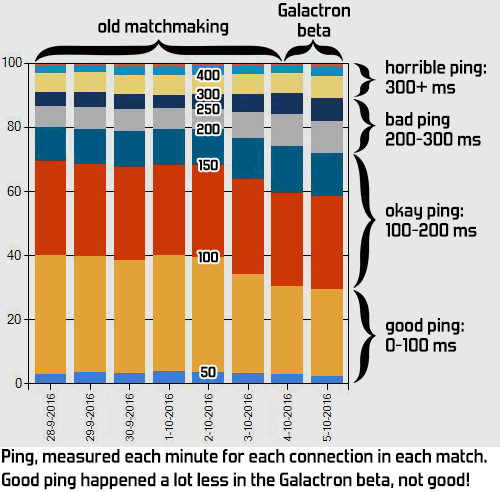
The other major complaint about Galactron is high ping. While Galactron is supposed to make the average ping lower, players complain that ping is higher. Again, let's look at the metrics to see whether they're right:


Here it turns out that the stats agree with the complaining players: average ping has indeed increased significantly in Galactron. This is a big problem that we need to solve. It's also a big surprise to us: Galactron contains a lot of clever tech to match players better, why isn't that working?

We've been analysing this extensively these past few days and have a bunch of theories, but we don't have the final answer yet. One thing we've noticed is that it seems like Galactron doesn't get enough ping data. While players are waiting for matchmaking the game pings all other waiting players. We expected this would give us ping data on at least 75% of all possible connections, but in practice this turns out to often be around 50%. This means that Galactron doesn't have enough information to make a good matchup. Figuring out why this happens is our highest priority now.

Another possibility is that Galactron may care about skill too much right now. Galactron needs to find the best match-up based on a bunch of criteria around ping and skill. It can't satisfy them all perfectly all the time so it tries to find a balance. We can tweak how important each criterium is and I think we might have made skill too important right now.

A final issue we're looking into is how to handle people with horrible internet. High ping can happen when you're playing against someone on the other side of the globe, but sometimes your opponent just has such a horrible internet connection that he has high ping to everyone, even to people near him. No matter who Galactron matches such players to, the connection will always suck. We haven't decided how to handle that yet. One option is to make such players only play against others with crappy internet and keep them out of the regular matchmaking, but that might give odd results in the leaderboards as they would always be playing against the same people. We'll have to observe this group more once the other issues are fixed.

Skill matching


This is an aspect where Galactron seems highly successful: matches are very balanced. There are still situations where players of differing skill play against each other, but this is now usually caused by premades in which the players don't have the same skill. We can't split premades so this can't be solved. What we can do however is balance such premades against another similar premade, or against other players with similar skill patterns. Galactron turns out to be able to do so quite often. We also see premades play against other premades much more often now than before.

It would have been nice to compare this to our snowballing stats, but unfortunately those weren't recorded in the Galactron live beta due to an oversight. We normally collect stats about how often one team has much more kills than the other team, and how often the losing team didn't destroy any turrets. It would be interesting to see those stats for Galactron, so it's a pity they weren't recorded during the last beta.

Waiting times


I've seen some complaints regarding long waiting times in Galactron. Galactron performs a matchmaking round once every 5 minutes. That means that if you start searching for a match just before the round starts you'll get a match really quickly, while if you start searching just after you'll have to wait the full 5 minutes. On average this means a waiting time of 2.5 minutes. That isn't that much longer than before: in the old matchmaking it might take up to 4 minutes before a match stars, and longer if it isn't full yet at that point.

It's easy enough to reduce the waiting time: we can just switch from 5 minutes per matchmaking round to 4 minutes. However, we're not sure we should: a shorter waiting time will also mean lower match quality. There's a balance we need to strike here between speed and quality, and for the moment we think 5 minutes is fine. If we keep seeing a lot of complaints about this we'll reconsider and might change it to 4 minutes at some point. Feel free to share your opinion on this in the comments below.

Crashes


There have been some reports on crashes in Galactron. We've investigated most of these and so far they seem to be caused by driver issues and by broken Steam downloads. The latter can usually be fixed by running Steam's Verify Integrity Of Steam Cache.

As for the driver issues: my theory is that the crashes that we have data on are caused by alt+tab. Unfortunately our crashdumps don't contain a history that tells us whether alt+tab happened just before, so we can't tell for sure.

If alt+tab crashes than your videocard drivers are problematic. The solution is really simple: run in Borderless Window instead of Full Screen. With Borderless Window the game still covers the entire screen, it's just a different way of asking Windows to do so. Borderless Window is much more stable when it comes to alt+tab, and it's also much faster at it. In general we advice never running Full Screen unless Borderless Window gives you problems. I think we might rename these options to reflect this, since I expect some people might not understand what Borderless Window means.

We're still investigating some of the crash reports. If we encounter any that are caused by Galactron, we'll fix them of course.

Bugs


Besides the things mentioned above there were also a bunch of random bugs. Most of those we've already fixed by now, or are working on fixing. Some of the most notable ones:
  • Global chat didn't work half the time.
  • One menu screen around the tutorial didn't accept any button input, making it impossible to progress if you got to this screen (ARGH!).
  • Some menu screens didn't support controllers properly; only keyboard+mouse worked there.

So there you have it, the current status of Galactron. If you have any further questions, complaints or suggestions on Galactron then please do post them below in the comments. We hope to do another beta 1.5 weeks from now. Hopefully that one will be good enough that we won't have to turn Galactron off again, but we'll have to see how it goes. Most important is that Galactron needs to be really good before it goes out of beta.

Saturday, 28 June 2014

Finding bugs through autotesting

Some bugs and issues can only be found by playing the game for ages in a single play session, or by triggering lots of random situations. As a small studio we don't have the resources to hire a ton of people to do such tests, but luckily there is a good alternative: a fun method is to hack automated controls into the game and let the game test itself. We have used this method in both Swords & Soldiers and Awesomenauts and found a bunch of issues this way.

Autotests are quite easy to build. The core idea is to let the game press random buttons automatically and leave it running for many hours. This is very simple to hack into the game. However, such a simplistic approach is also pretty ineffective: randomly pressing buttons might mean it takes ages to simply get from the menu to actual gameplay, let alone ever actually finishing any levels. It gets better if you make it a little bit smarter: increase the likelihood of pressing certain buttons, or even just automatically press the right button in certain menus to get through them quickly. With some simple modifications you can make sure the autotesting touches upon many different parts of the game.


This kind of autotesting has very specific limited purposes. There are a lot of issues you will never find this way, like if animations are not playing, texts are not displaying, or characters are glitching through walls. The autotester does not care and keeps pressing random buttons. Basically anything that needs to be seen and interpreted is difficult to find with autotesting, unless you already know what you are looking for and can add a breakpoint in the right position beforehand.

Nevertheless there are important categories of issues that can be found very well through autotesting: crashes, soft-crashes and memory leaks. A soft-crash is a situation where the game does not actually crash, but the user cannot make anything happen any more. This happens for example if the game is waiting for a certain event but the event is never actually triggered. Memory leaks are when the game forgets to clean up memory after usage, causing the amount of memory the game uses to keep rising until it crashes. Especially subtle memory leaks can take many hours before they crash and are thus often never found during normal development and playtesting.

Another category of issues that can be found very well through autotesting is networking bugs. This one is very important for Awesomenauts, which has a complex matchmaking system and features like host migration that are hard to thoroughly test. Our autotesting automatically quits and joins matches all the time, potentially triggering all kinds of timing issues in the networking. If you leave enough computers randomly joining and quitting for long enough, almost any combination of timings is likely to happen at some point.

Recently we needed this in Awesomenauts. After we launched patch 2.5 a couple of users had reported a rare crash. We couldn't reproduce the crash, but did hear that in at least one case the connection was very laggy. Patch 2.5 added Skree, a character that uses several new gameplay features (most notably chain lightning and spawnable collision blocks). This made it likely that the crash was somewhere in Skree's netcode.


We tried reproducing the crash by playing with Skree for hours and triggering all kinds of situations by hand. To experiment with different bad network situations we used the great little tool Clumsy. However, we couldn't reproduce the crash.

I really wanted to find this issue, so I reinvigorated Awesomenauts' autotesting system. We had not used that in a while, so it was not fully functional anymore and lacked some features. After some work it functioned again. I made the autotester enter and leave matches every couple of minutes. Since I didn't know whether Skree was really the issue I made the game choose him more often, but not always. I also made the autotester select a random loadout for every match and made it immediately cheat to buy all upgrades. The autotester is not likely to accidentally buy upgrades otherwise, so I needed this to have upgrades tested as well.

I ran this test on around ten computers during the soccer match Netherlands-Australia. While we beat the Australians our computers were beating this bug. Using Clumsy I gave some of those computers really high artificial packet loss, out-of-order and packet duplication.

Watching the computer press random buttons is surprisingly captivating, especially as it might leave the match at any moment. Simple things like a computer being stuck next to a low wall become exciting events: will it manage to press jump before quitting the match?

Here is a video showing a capture of four different computers running our autotest. The audio is from the bottom-left view. Note how the autotester sometimes randomly goes back to the menu, and can even randomly trigger a win (autotesters are not tactical enough to destroy the base otherwise):


And indeed, after a couple of hours already three computers had crashed! Since I had enabled full crash dumps in Windows, I could load up the debugger and see exactly what the code was doing when it was crashing.

The bug turned out to be quite nice: it required a very specific situation in combination with network packets going out of order in a specific way. When Skree dies just after he has started a chain lightning attack, the game first sends a chain lighting packet and then a character destroy packet. If these go out of order because of a really bad internet connection, the character destroy packet can arrive first. In this case the Skree has already been destroyed when his lightning packet is received. Chain lightning always happens between two characters, so the game needs both Skree and his target to create a chain lightning.

Of course we know that this kind of thing can happen when sending messages over the internet, so our code actually did check whether Skree and his target still existed. However, due to a typo it also created the chain lightning if only one of the two characters existed, instead of if they both existed. This caused the crash. Crashes are often just little typos, and in this case accidentally typing || ("OR") instead of && ("AND") caused this crash.

Once we knew where the bug was, it was really easy to fix it (the fix went live in hotfix 2.5.2). Thus the trick was not in fixing the code, but in reproducing the issue. This is a common situation in game programming and autotesting is a great tool to help reproduce and find certain types of issues.

Saturday, 5 April 2014

How we solved the infamous sliding bug

Last month we fixed one of the most notorious bugs in Awesomenauts, one that had been in the game for very long: the infamous "sliding bug". This bug is a great example of the complexities of spreading game simulation over several computers in a peer-to-peer multiplayer game like Awesomenauts. The solution we finally managed to come up with is also a good example of how very incorrect workarounds can actually be a really good solution to a complex problem. This is often the case in game development: it hardly ever matters whether something is actually correct. What matters is that the gameplay feels good and that the result is convincing to the player. Smoke and mirrors often work much better in games than 'realism' and 'correctness'.

Whenever the sliding bug happened, two characters became locked to each other and started sliding through the level really quickly. With higher lag, they usually kept sliding until they hit a wall. I have recorded a couple of mild examples of this bug, where the sliding stops quite quickly but still clearly happens.


Note the weird way in which the collision between Froggy and the worms happens.

To understand why this bug happened, I first need to explain some basics of our network structure. Awesomenauts is a purely peer-to-peer game. This means that the simulation of the game is spread out over all the players in the game: every computer is responsible for calculating part of the gameplay. Particularly, each player manages his own character. The result is that character control is super fast: your computer can execute button presses immediately and there is no lag involved in your own controls, since there is no server which has final say over your own character. Of course, lag is still an issue in interactions with other characters that are managed on other computers.

Spreading out the simulation like this is simple enough, until you starting looking at collisions. How to handle when two characters bump into each other? Luckily Awesomenauts does not feature real physics, which would have made this even more complex. Our solution is simply that each character solves only his own collisions. So if two players bump into each other, they solve only their own collision (in other words: they move back a bit to make sure they don't collide anymore). They don't interfere with the other character's position at all. This works pretty well and is very easy to build, but it does become difficult to control the exact feel of pushing a character, since lag is part of that equation.


This works because normally both players will try to resolve their collision in the opposite direction: the character to the right will move to the right and the character to the left will move to the left, thus moving them away from each other.

Which brings us back to the sliding bug. This bug happens when the computers disagree on who is standing to the right and who is standing to the left. If both computers think their player is standing to the right, then they will both try to resolve the collision by moving to the right. However, since they both move in the same direction the collision is not actually solved, so they keep sliding together until they hit a wall.


It is clear how this would cause sliding, but why would the computers disagree on who is standing to the right? This requires both lag and a relatively rare combination of timing and positioning. This is a difficult one to explain, so I'll first explain it in words and then in a scheme. I hope the combination makes it clear what is happening.

Let's look at the situation when two players are both moving to the right. Lonestar is in front and Froggy is behind. Froggy is moving faster, so Froggy is catching up with Lonestar. Now Froggy jumps and lands on top of Lonestar. Because of lag, the jumping Froggy sees a version of Lonestar that is slightly in the past. Since Lonestar is moving to the right, his past version is still a bit more to the left. The resulting positioning is such that Froggy thinks he is further to the right than Lonestar, so Froggy starts resolving his own collision to the right. Lonestar on the other hand sees a past version of Froggy (again because of lag) and thinks he himself is to the right. The lag makes both Froggy and Lonestar think they are on the right side.


We originally thought this would be a very rare bug, but in practice it turns out that it happened often enough that most Awesomenauts players encountered it occasionally. In fact, there was one top player who was able to aim Froggy's Dash so well that he could trigger this bug almost every time. He used it to attach his opponents to him to do maximum damage with the Tornado after the Dash. Impressive skills! Gameplay mechanics that are so difficult to time are cool because they raise the skill ceiling in a game, but it was a bug so we did want to squash it.

Since we thought it was rare and since we couldn't think of an obvious solution, we first ignored the bug for quite a while, until a couple of months ago I managed to finally come up with an elegant solution. Or at least, so I thought...

The solution I came up with was to turn off collision handling for one of the players whenever the sliding bug occurs. This way they stop sliding together, and the character who still handles collisions will resolve the collision for both of them by moving himself a bit further than he normally would. The collision is only turned off between these two characters and only for a short amount of time.

This requires knowing when the bug is happening, which is not obvious because the bug is happening on two different computers over the internet. To detect occurrences of the bug we added a new network message that is sent whenever two players collide. The player with the lowest objectID sends a message to indicate which side he believes he is on. This is a very simple message, simply saying "I am Froggy, I am colliding with Lonestar and I think I am to his right". Lonestar receives this message and if it turns out to be inconsistent with what he thinks is happening, then Lonestar turns off his own collision handling and lets Froggy resolve the collision on his own.


This is simple enough to build and indeed solves the basic version of the sliding bug, but it turned out to feel pretty broken. There are two reasons for this. The first is that in the above situation, if often happens that a character starts resolving his collision in one direction, and then in the other direction. This felt very glitchy, as the character moved in one direction for a bunch of frames and then suddenly moves in the other direction.

The second and bigger problem is that our collision resolving is done at a relatively low speed. We do this deliberately, because this way when you jump on top of a character, it feels like you slide off of him, instead of instantly being pushed aside. This is a gameplay choice that makes the controls feel good. However, this means that collision resolving is not faster than normal walking, so it is possible for Lonestar to keep walking in the same direction as in which Froggy is resolving the collision. This way the collision is never resolved and Froggy keeps sliding without having control. This may sound like a rare situation, but in practice player behaviour turned out to cause this quite often, making this solution not good enough.


Seeing that this didn't work, I came up with a new solution, which is even simpler: whenever the sliding bug happens, both characters turn off their collision, and it is not turned on again until they don't collide any more. In other words: we don't resolve the collision at all!

This sounds really broken, but it turns out that this works wonders in the game: players rarely stand still when that close to an enemy, so they pretty much instantly jump or walk away anyway. In theory they could keep standing in the same spot and notice that the collision is not resolved, but this hardly every happens. Moreover, even if it does happen, it is not that much of a problem: teammates can also stand in the same spot, so two enemies standing in the same spot does not look all that broken.


This solution has been live on Steam for over a month now and as far as we know, it is working really well.

As you might have noticed, this has been a pretty long and complex blogpost. The sliding bug is just one tiny part of network programming, so I hope this makes it clear how complex multiplayer programming really is. There are hundreds upon hundreds of topics at least as difficult as this one that all need to be solved to make a fast-paced action MOBA like Awesomenauts. Also, this solution is a very nice example of something that seems really wrong and way too simple from a programming standpoint, but turns out to work excellently when actually playing the game.

Sunday, 16 March 2014

Coding structures that cause bugs

Bugs are usually caused by simple things like typos and oversights. As a programmer, this might make you think you need to become smarter and concentrate better, or maybe you conclude that bugs are simply part of any programmer's life. Both are of course partially true, but there is more to it than that. There are methods that can be used to reduce the chance of creating bugs (even though such methods won't fix all of them).

One of those is better coding structure. Ideally code is structured in such a way that mistakes and oversights are not possible, and that the code is easy to understand. In practice these goals are often not fully achievable, for example because they contradict with the amount of time you have to build it, or the performance requirements, or maybe the problem you are solving is just too complex for easy code. Nevertheless, striving for good structure does make a big difference. Today I would like to give a couple of examples of common coding practices in C++ that can easily cause bugs. Even if you want to keep using them, knowing the pitfalls can help avoid issues.

You might disagree with the examples given here, but I hope they at least help you think about how you structure your code and why. In the end there is no absolute answer to what good code is, but I do believe that to be a good programmer, one needs to think about what good code structure is, and which features of a language to use and which to avoid.

Initialise() functions

Some classes have a separate initialise() function. This means that after having constructed the class, you need to first call the initialise() function before you use it for anything. This is often done because constructors don't have return values (and can thus not return errors in the normal way), or because classes cross-reference each other and they both have to exist before either can be fully initialised.

However, using initialise() functions introduces a new situation that is prone to bugs: it is now possible to have an instance of a class that is not initialised and thus not ready for usage. All kinds of bugs might happen if you forget to call initialise() and then start using the class. This can be fixed by keeping a bool isInitialised in the class and checking for that before usage, but that of course introduces another thing that needs to be remembered and is thus ready to be overlooked by a future programmer working on that class, causing even more bugs.

For this reason it is generally wise to avoid separate initialise() functions altogether. Just create everything in the constructor. This principle is called RAII ("Resource Acquisition Is Initialisation"). If you want to do error checking in the constructor, you can solve the problem of not having a return value by using try/catch.

Default parameters

Default parameters are parameters in functions that have a default value, so that you can skip them if you don't need something special. Like for example:

void eatFruit(string fruitType = "banana");

//Can leave out the fruitType when calling this function
eatFruit();
eatFruit("kiwi");

Default parameters are a useful tool: some functions are often called with the same parameters so it is nice to be able to just skip them in those cases. However, default parameters can also be dangerous because it is easy to forget about them, especially when refactoring. In the development version of Awesomenauts I recently created a crash bug while refactoring a piece of code. Here is what I changed:

//Old code
TemporaryAnimation(ParticleFadeManager* particleFadeManager,
                   RumbleManager* rumbleManager,
                   unsigned int textLocalizationIndex,
                   RenderGroup renderGroup = RG_STANDARD);

//New code after refactoring, with one new parameter
TemporaryAnimation(ParticleFadeManager* particleFadeManager,
                   RumbleManager* rumbleManager,
                   ReplayFrameStorer* replayFrameStorer,
                   unsigned int textLocalizationIndex,
                   RenderGroup renderGroup = RG_STANDARD);

I use the compiler a lot while refactoring, so when I change something like adding a function parameter I often just hit compile to see where it is used. In this case however this was a bad choice because the default parameter caused the compiler to interpret my code in a different but still compilable way. Here is the line that caused the crash:

animation = new TemporaryAnimation(particleFadeManager,
                                   globalRumbleManager,
                                   0,
                                   RG_MENU);

Originally the '0' was the textLocalizationIndex, but after refactoring it was interpreted as a NULL pointer for the replayFrameStorer. The compiler didn't complain because RenderGroup is an enum and can thus be interpreted as an unsigned int. So RG_MENU was now interpreted as the textLocalizationIndex and the renderGroup now used the default parameter RG_STANDARD. Really broken code, no compiler error.

Had I not used default parameters here, the compiler would have given an error because I was passing in one parameter too few.

This is just one example of a situation where default parameters have given me such headaches: I have encountered several other situations where I overlooked things because of default parameters.

Also, I prefer if someone who calls a function actually thinks about what he is passing to it, and default parameters don't encourage thinking: they encourage ignoring. So despite their usefulness, I generally try to avoid default parameters.

Constructor overloading

When a class has several constructors, this is called constructor overloading. In university I was taught this is a useful tool for all kinds of things, but in practice it turns out it is often a headache. It creates situations where it is easy to overlook something and introduce new bugs. Let's have a look at an example of this:

class Kiwi
{
private:
    string colour;
    const float softness;
    const float tastiness;

public:
    Kiwi(const string& colour_):
        colour(colour_),
        softness(1),
        tastiness(1)
    {}

    Kiwi(float softness_):
        colour("green"),
        softness(softness_),
        tastiness(1)
    {}
};

The problem here is that I need to initialise everything in every constructor. The tastiness variable is always set to 1, but I have to set it in each function. This means code duplication. Code duplication can be avoided by using a common function that all constructors call, but this is not always possible. In this specific case for example the tastiness variable is const and can thus only be initialised in the initialiser list, not in a separate function.

Even worse worse than code duplication is that if I add a new variable to the class, I need to remember to initialise it in every constructor. Forgetting about one of the constructors has caused bugs in our code in several situations, so we now try to avoid constructor overloading altogether.

Conclusion

These three examples show how certain structures cause bugs. None of these structures are bad per se and they each have their use, despite the risks. In fact, I use these occasionally myself, simply because sometimes the alternatives are worse. However, knowing the risks of certain structures helps make good decisions on when to use them and when not to use them, and to first consider alternatives whenever you think you need them. It is important as a programmer to think about the pros and cons of anything you do, and to always look for better structure.

Friday, 1 February 2013

The craziest bugs, part 2

Last week I started the top 7 of my favourite bugs with the numbers 7 to 4. The top 3 is where it gets really crazy. Sit back and enjoy to see how amazingly stupid game development can sometimes be!

Click here for numbers 7 to 4

3. Hidden functionality to turn off bugs

On one of the platforms Awesomenauts launched on, we had a lot of trouble getting the internet connection between players to remain stable. After a while the ping would always start slowly increasing, until in the end it got too high and the game disconnected. Sometimes this took a couple of minutes to start, sometimes half an hour, but in the end this always happened.

We contacted the support team for the platform-specific networking library that we were using, and their answer was that we used too much bandwidth and sent too many packages. So we spent a lot of time optimising, and we managed to half the number of packages and half the bandwidth. However, the problem remained, and they again told us we used too much bandwidth. Again we halved the bandwidth and the number of packages, but the problem remained. At this point we were well below what they said was the ideal bandwidth usage and we couldn't optimise much more, so we were getting pretty desperate and contacted them again.

And then it happened...

Their answer was that their bandwidth throttling code was quite buggy, so there was a hidden enum that we could use to turn that code off. We used that and... the problem was instantly fixed! So they knew they had a bug, they even had an option to turn that bug off, but they didn't tell us for two months! I spent all that time doing extra bandwidth optimisations and it wasn't even necessary! Blargh!

Of course, using less bandwidth is always an important improvement for a multiplayer game, but we were already enormously behind on schedule at that point and this took a lot of time for a small indie studio...


2. Lying videocards

This has been a personal gripe of mine for years. Some videocards simply lie about their specs. Your game asks the videocard what it can do, and it will proudly brag about features it doesn't actually have!

I have not yet used any of the newer videocard features like geometry shaders, hull shaders and compute shaders, so I have not encountered any lying videocards recently, but I would be surprised if this doesn't still happen when you try to use state-of-the-art videocard features. It sure did a lot around the appearance of shader models 2 and 3. (Note that I haven't used the new shader types because I think they are uninteresting, but that's a long story that I will not go into today. Instead, I will just leave it at the short and controversial statement that they are irrelevant.)

I had to work around such lying videocards in both Proun and De Blob. What happens is that I make special versions of my shaders for different shader models, so that older videocards can still run the game, but with less special effects. The Ogre-engine has a very elegant system to handle this, and thus Proun features proper materials for shader models 1, 2.0, 2.x and 3.0.

The core of this solution, however, is that you ask the videocard which shader models it supports, and then pick the highest allowed for the best quality. This works very well, unless the videocard lies. It might claim to support 3.0, but doesn't really work with it. In the worst case, the videocard doesn't even give a compile error when being fed a 3.0 shader and simply outputs black pixels!

Several older Ati videocards turned out to do this in a horrible way. The solution ended up to hardcode the names of such videocards and feed them different shaders based on their name. If you look in the Proun folder structure, you can see folders with the same materials, but for different videocards, with beautiful names like "NotX8orX9". That last one contains materials that cannot be used on Ati X8** and X9** cards. I even have another set of materials for Ati X1*** and X2*** cards, because they lie in a different way...


1. "If I buy the game, it isn't the demo any more"

Yes, you read that title correctly. This is by far the most hilarious bug report I have ever seen, and easily claims the number 1 spot in this list, despite not even being a real bug. It was reported to us through the bug database though, so it qualifies for this list!

A professional QA testing company that was testing one of our games for us, at some point reported to us that if they bought the full game from the demo, then when they came back to the game, it wasn't the demo any more. It was instead... the full game!

Oh really?

That happens to be the point of buying the game, now isn't it?

When I replied in the bug database that either I didn't understand what they meant, or this bug report was a slight mistake from the tester, a producer quickly removed the bug from the database, so I never received an actual answer to that.

I think the reason they reported this, is that that particular shop (outside the game, not made by us) concluded the buying process with a question like "Do you want to go back to the game?" Whether you chose "Okay" or "Cancel", the shop always brought you back to the game, and apparently the tester concluded from the fact that there were two options that one of them ought to bring you back to the demo, even though the game had just been bought. This is some pretty broken reasoning, but I can imagine where it came from.

(As crazy as this bug report may be, though, I would like to emphasize that this is the only silly report this testing company wrote to us. The rest of the reports made perfect sense, so this one mistake really shouldn't be held against them! That doesn't make it any less hilarious, though...)

That's it, folks! The 7 weirdest bugs I have encountered! Come back next week when I will discussion the Awesomenauts animation pipeline or visual effects performance (I haven't really made up my mind yet which it is going to be...)

Friday, 25 January 2013

The craziest bugs, part 1

Every programmer must have encountered these: weird bugs. Unexplainable bugs that make you want to tear your hair out. Bugs that are just plain funny in their bizarreness. Even bugs that are pants-on-head-retarded. I have written about a very out-of-the-box bug and a painful oversight bug before, and since then I have encountered hundreds (or was it thousands?) of other bugs. Today I would like to give you my favourites.

These bugs are from various categories: from funny, to surprising, to dumb library design. Most we have been able to solve, but for some the exact cause still remains a mystery. The one thing they have in common, is that I remember them fondly. Or frowning. Or while gritting my teeth...

Click here for numbers 3 to 1

7. Std::abs differs between compilers

This is one I encountered recently in Awesomenauts. We thought hardly any Mac users would have gamepads, so we had initially decided not to support those on Mac. After launching Awesomenauts on Mac, this turned out differently, and a lot of Mac users requested proper controller support. We decided to try to patch this in quickly before Christmas, but one particular bugs almost kept Mac joystick support from making it into that patch.

It turned out that the sticks would only work if they had full output. Pressing them to anything but fully right or fully left had no effect in the game whatsoever. Somehow, our joystick class outputted proper floats in the complete [-1, 1] range, but once they got to our gameplay code, they were only 0, -1, or 1. I didn't see any spots where they were turned into ints, so how was this happening?

The reason turned out to be std::abs(). Normally, this function only works on integer types, and fabs() is used for floating point numbers. However, in Visual Studio abs() also works fine on floats, and we had used it in that way on a joystick axis value somewhere. This version of abs() does not exist on Mac! When we tried to use gamepads on Mac, the compiler did not print a warning and instead simply rounded the decimal axis value to an int and applied abs() to that. Since at that point the axis value was already in the range [-1,1], this meant that everything but -1 and 1 were rounded to 0...

Luckily, we found this one in time and were able to patch in Mac gamepad support before Christmas. And our Mac users lived happily ever after... (or so I hope!) However, I still find the combination of Visual Studio having extra functionality and the Mac compiler not printing a warning pretty nasty!

6. Editor framerate extremely low around centre of world

This is a bug that our artists at some point started complaining about. When using our in-house animation editor, the framerate became incredibly low, unless they moved the camera away so that the centre of the world was not in view any more. I didn't have time to look into this right away, but strangely over time the bug seemed to grow worse and worse, until the editor was hardly usable any more.


Quite puzzled, I dove in. I quickly discovered that the renderer was responsible for the framedrop, so I started gathering data on what exactly was being rendered. The cause proved to be quite... interesting.

Awesomenauts in total has over 4000 animations at the moment, and these contain some 5500 particle systems. It turned out that in the editor, all of these particles were always rendered, but with 0 particles each. The renderer did not check for this, and set up shaders, textures and matrices for these particle systems, and then proceeded to feed the videocard a whopping 0 polygons to render. Doing this 5500 times per frame is not a good idea... The solution was twofold: the renderer should check for polygon count before rendering, and the editor should hide these empty particle systems to keep them from reaching the renderer at all.

I tested the results of fixing this on two computers, and on one the framerate went from 28fps to 115fps in the editor, while on the other it went from 36fps to 273fps. Those are the nicer optimisations!

But why did this only happen at the centre of the world, and why did it grow worse over time? This is because most animations are quite small, and all their objects are near the centre of the animation, including the particles. After some more experimentation, it turned out that since the particles are not all exactly at the centre of the world, scrolling around would gradually increase the framerate as more of the area near the centre went out of view. Finally, the reason it grew worse over time, was that our artists were quickly producing more and more animations for the skins we were adding to Awesomenauts, adding more and more particles to destroy the framerate...

5. Disappearing textures

This is an issue that I actually haven't been able to pinpoint and solve, but it is so bizarre, that it deserved a place on this list. A user reported that at some point, Awesomenauts suddenly started looking like this:


He also posted a video of this event. What you are seeing here, is that the main view of Awesomenauts has been replaced by a small portion of the Steam overlay. The letters are names and the lowest line even mentions Steam's standard shortcut: shift+tab. On top of that, the Awesomenauts HUD is visible, as it should.

The reason I have so far not been able to find the cause of this bug, is that it is extremely rare: it has only been reported to us twice. One of my colleagues also had something similar once: a Steam icon had somehow replaced an icon in our own scoreboard. None of these cases ever happened again. Without any way to reproduce or test, I cannot solve this weird bug.

I can guess what is happening, though: somehow a texture from Steam replaced one of my own textures. The reason this replaces the entire screen in the image above, is that apparently the texture being replaced is the rendertexture that is used to apply post effects to the screen. The other report I saw confirmed this: there a different rendertexture was broken, causing only the background to look black (the background is rendered separately to apply depth of field blur, as I previously wrote about in this blogpost).

This makes me suspect that the problem might not even be in our own code: to render their overlay, Steam pretty much hacks into my rendering process every frame. I imagine the problem might for example be that something in Steam's code is problematic with the way I handle threading in my renderer. So this might not even be a bug in my own code... In the meanwhile, since this bug is extremely rare, I have decided to just leave it be.

4. Random programs interfere with my game

I don't know exactly how they manage to do this, but sometimes random programs manage to break Awesomenauts on PC. The worst offender is Adobe Air: this sometimes completely obliterates a player's internet, causing unplayably high ping in Awesomenauts. This doesn't happen for most users, but I have seen a dozen or so reports from players who managed to fix their high ping in Awesomenauts by uninstalling Adobe Air. This isn't just in Awesomenauts: I have also seen reports of the exact same thing in another game by a different developer.

Another example of random other programs messing up our game, was reported by a player. This user had a very laggy, uncontrollable mouse cursor, but only during gameplay. I had no idea what caused this, but at some point the victim reported that the problem had went away. What had he done? He had updated... Java! Java!? What does that have to do with Awesomenauts? Awesomenauts is written in C++ and doesn't use any JAVA components! I still don't know how JAVA is able to break the mouse cursor in Awesomenauts, but it is a nice example of how completely unpredictable PC development can sometimes be. Consoles may be much more complex to develop for, and they may have all kinds of certification requirements, but at least they are always the same! Hurray for that!

That was it for the bugs today! The four bugs above were still somewhat sane, but the rest of this list won't be. Visit back next week for the top 3, where the real insanity happens!

Sunday, 11 March 2012

The weird cause of Swords & Soldiers network errors

Last week we released a patch on Steam that finally fixed the networking issues some people were having with the PC version of Swords & Soldiers. I'm afraid that because of the work on Awesomenauts, we didn't come to it any earlier. But we finally fixed it now! :)

Now this bug we fixed was a pretty interesting one. Not as interesting as the bug I posted about last December that got my blog a whopping 40,000 viewers in a couple of days, but still interesting enough to share it with you. This one is another nice example of how bug fixing sometimes requires thinking far outside the box.

We were getting two bug reports from users:
  • Some users always got a Network Error at the start of a match.
  • Some users encountered cheaters who introduced so much lag, that the game became unplayable for the player on the right side of the map.

We initially just assumed the Network Errors were being caused by firewalls or bad router settings. But these users were not having trouble in other games, and it even didn't work when they turned off their firewalls. We also had a user who told us it worked on his laptop and not on his PC, while both were on the same network. That pretty much ruled out router issues as well.

As for the 'cheaters': we immediately had the hunch that this might as well be a network bug in our code somehow, and not really someone cheating.

We had looked at this bug at various moments in the past year without success, and wondered whether it was still a firewall, or something in the Steam networking libraries. We even sent the Steam support team questions about this one. They didn't know any bugs in their system that could cause this, which was of course right, since this turned out to be a bug in our own code...

So, what was up? In a very bright moment, my colleague Maarten, who does a lot of network programming at Ronimo Games, suddenly realised what was happening: to check what the ping is and to keep the connection alive, we regularly send ping messages over the network. Accidentally, we did that every frame. Now sending 60 extra messages per second over the network is a really bad idea, but does not usually kill a connection. However, and this is where we are getting way out of the box: some users had forced vsync to be turned off in their drivers. For those who don't know: vsync makes sure a game runs at the same framerate as your screen, usually 60 frames per second. Forcing vsync off means Swords & Soldiers might be running at hundreds of frames per second on their computers! Sending that many ping messages instantly kills most connections.

This also explains the 'cheaters': if the framerate is not high enough to actually kill the connection, it can still be high enough to make the connection really bad. The player whose computer is server in a match won't notice this, but the other player (whose computer is the client) gets so much lag he can hardly play anymore.


So, the solution was really simple: instead of sending the ping message every frame, we now send a small, fixed number of them every second. Which is actually what we had intended in the first place, had a bug not thwarted our plans!

So, another nice example of how bug fixing requires letting go of all assumptions, and researching with an open mind what is actually happening. Until we found this bug, I never would have connected vsync with networking errors!

I would like to thank the Steam users who helped us with testing to find this issue! I would also like to thank those who offered help that we ended up not using. It is great to see that gamers are so willing to help when we are stuck on a bug! Thank you very much, folks! :D

PS. If anyone encounters any new or further issues, then please don't hesitate to post them at the Steam forum or our own forum, and we will look into them as soon as we can!

Friday, 6 January 2012

Building hundreds of upgrades for Awesomenauts

In Awesomenauts, players can buy hundreds of different upgrades. There are around 150 unique ones, and most have two or three upgrade levels, so in total there are probably around 300 upgrades in the game. We wanted our designers to be able to create those themselves, without any work from the programming team for specific upgrades. At the same time, we also wanted the upgrade system to be super flexible, so that the upgrades would be very diverse, and not just all be cooldown reductions and damage increases.


When we first started looking for a way to build this, I was really at a loss. How to add a flexible system for upgrades to our settings system? It took some time, but coding intern Daan and I came up with a system that is easy to use and so flexible, that we ended up not just using it for upgrades, but also for temporary boosts and areas with modified mechanics, like low-gravity areas.


The idea is that for every setting, our designers can create modified versions for when a character has certain upgrades. Each setting always has one base value. Then as many modified versions can be added as desired, simply by copying the setting and adding @ and the name of the upgrade.


The @ sign works for many things, but it has the problem that it is problematic to have different upgrades for the same setting: what should happen if you have both upgrades? So we also introduced the + sign, which means that that upgrade's value is added to the original value. This way several upgrades can influence the same value.


This system does not just allow for simple upgrades that upgrade a single value, but can also be used for more complex stuff. Especially since our designers can give a player a temporary upgrade when he presses a button. So let's say we want to create a skill that temporarily makes the player deal twice as much damage, but also make him half as fast and twice as big. A designer could simply use the name of a single upgrade to modify all of these values at the same time.

Of course, the more flexible and complex things get, the easier it is for our designers to mess up. We have had quite a few bugs where certain combinations of upgrades behaved in a different way than our designer intended, simply because they chose the wrong values. The plus side of these kinds of bugs is that our designers can fix them themselves, so as a programmer I am okay with that... ;)

The upgrade system also gives our artists a lot of flexibility. For example, if a bullet does more damage, our artists can upgrade its graphic and its explosion to use a different animation.


The upgrade system described in this blogpost looks pretty obvious to me now, but it definitely was a revelation to us when we came up with it two years ago, and I still think it is the most elegant solution we came up with for any problem at Ronimo Games so far (although I suppose this system is not unique and other RPGs probably use something very similar). It is incredibly flexible and really easy to use, and allows our game designers to make almost any upgrade they want. And the good thing is that it is not specific to any games, so anything we make with the Ronitech (our engine) will have this feature for our designers! ^_^

Next week, I'll explain the technical side of how we made this upgrade work in C++!

Saturday, 10 December 2011

The lamest bug we ever encountered

Yesterday we resolved by far the lamest 'bug' I have ever encountered. We spent almost two whole days with the entire programming team (5 coders) trying to find it, and once we discovered what was happening, it felt so incredibly lame, that I figured it would be a nice story to share. So here's what happened!

In the past half year we have seen a really rare bug occur about once per month in Awesomenauts on the Playstation 3: suddenly the game would freeze for anywhere between 10 to 100 seconds, and then continue normally as if nothing weird had happened. We always have a PC connected to collect logs from the game. However, the log printed nothing interesting and showed simply the framerate, which is printed once per second:
13:48:13 60fps
13:48:14 60fps
13:49:21 1fps
13:49:22 60fps

From this we concluded that the issue must be in some part of code that does not log anything. That leaves 99% and with a codebase of at least 150,000 lines, that is a lot!

Since this issue was so rare and we hadn't seen it in months, we had closed it. We thought it was an anomaly that we couldn't find or fix and that had somehow disappeared.

Until we were testing our latest build last Thursday. We were playing on seven Playstation 3 devkits, when suddenly 4 of them froze for about 90 seconds. Argh! We thought this really difficult bug had magically disappeared, and now it was back, with a vengeance! We cannot leave a bug in that happens so massively on all these consoles at once!

Again, no relevant logging. Yet something really interesting nevertheless: these Playstations were in different online matches, so they weren't even talking to each other! So how could they all freeze at the exact same time? We concluded that the only thing they had in common, was that they all talk to the same Sony matchmaking servers, so we started investigating all our code related to that. However, we couldn't find anything relevant.

So we added a lot more logging, and did some really advanced stuff to get more info on the stack during the freeze (which is difficult to get from an executable that has been stripped of all debugging info), and started playing again. I let the Playstations perform our automatic testing all night, and the bug didn't happen. Then we played the game for five more hours with the entire team and BAM!, it finally happened again on two consoles!

This time, we had more info, and it turned out that the spot where the game froze was different on both freezing consoles, and both did not contain any calls to Sony's matchmaking servers. In fact, it was in between two logging calls, in a spot where nothing relevant was happening. So we concluded there were only two possible causes: either other threads were hogging the entire CPU (due to how the scheduling system on the Playstation 3 works, high priority threads can do this permanently), or the logging itself was broken.

So we started experimenting around that, and now we quickly found the cause of this 'bug': when the PC that is tracking logs goes into sleep mode, the connected consoles freeze a little while later; once the PC is awoken once more, the consoles continue as well a little later. The PC that was tracking the logs automatically went into sleep mode after not touching it for 30 minutes. This only happened during extensive play-testing, because people normally actually use that PC. So it wasn't even a bug in our code! ARGH! Especially since logging is turned off in the release build...

This may all seem really obvious in hindsight, but in general when we have a bug/freeze/crash it is in our own code, not in one of the tools we use. With such a big codebase, it is easy to not even think about something else. Also, in the chaos of 14 people playing the game on 7 consoles, it is easy to overlook one specific PC going into Sleep mode a little bit before the consoles freeze... Also, I still don't know why not all consoles connected to that PC froze.

So, this hard to find and very persistent bug turned out not to even be a bug! And what do we learn from this? Two things:
1. Really nasty bugs are often in a totally different spot than where you are looking.
2. Sometimes you encounter the lamest and most frustrating stuff while programming games!

Saturday, 10 September 2011

Proun patch v108 released!

It took way too long, but in the middle of the crunch time for Awesomenauts, I finally found the time to fix a couple of bugs in Proun! This patch only fixes bugs and does not add new features, so no need to apply it you weren't encountering any bugs before. You can find the patch and info on how to use it here:

Proun patch v108

These fixes are mainly for some specific videocards by Intel and Ati. Note however that I do not have these videocards myself, so I have not been able to test this patch well enough. So I hope some people who had trouble running Proun before can give it a try and let me know whether this fixes anything!

Quite a while ago, I wrote a blogpost about The horror that is PC development. Some of the specific issues I fixed in this patch are definitely in that same category, so I find it interesting to discuss what went wrong:

Bug 1: Crash on some ATI Radeon cards

It turns out that ATI cards from around the time of the Radeon X1xxx series are officially liars. These are some pretty old cards, from around 2005. When the engine (Ogre 3D) asks such a card whether it supports shader model 3.0 shaders, it happily says it does. Then when I feed it some really complex pixel shaders, it refuses and gives an error. Turns out these cards support most of 3.0, but not everything! So my depth of field blur crashed on this.

Here is the really frustrating part: I already had a simpler version of these shaders in the game, but because the videocard lies about its capabilities, Ogre tries to load the advanced shader. Crash! Knowing this, the solution was actually pretty simple: I have added rules to the materials that tell the engine that these specific cards need to use the simpler version, regardless of what they claim they can do.

Bug 2: Crash on some Intel cards

A somewhat similar crash happened on certain Intel cards. Intel cards from the GMA 3xxx series (released around 2006) can only do vertex shaders through software emulation. This is not a problem in itself: it just means you get a very low framerate, but everything would still work. However, DirectX handles this in a strange way: when you ask IDirect3D9 whether vertex shaders are supported, it says no. So the Ogre engine thinks these cards won't be able to run Proun at all. The IDirect3DDevice9 on the other hand will say yes. Quite weird, really, but someone discovered this and fixed the Ogre engine to ask both IDirect3D9 and IDirect3DDevice9 and use the best answer.

However, this fix was released around the same time when Proun was released. Since updating your engine version so near release is a bad idea (since it has not been tested well enough), that fix did not end up in Proun. So all I had to do now was add that fix to repair this crash.

Bug 3: Broken math

The final bug is exclusively my own mistake and not about weird PC graphics stuff. It turned out I had a math error somewhere that very rarely crashes the game. I already discovered this crash one week after launch, but because it happened so rarely, I was not able to find the cause. I have some data from the highscore server and I estimate this crash happened once every 10.000 runs through Composition #2. That is pretty rare. But help came from an unexpected direction: the recent user track Cubed has a point where it almost always triggers this situation! So now I was finally able to find out what happened, and fixed it. Turned out this was a mistake in the vehicle math that I made six years ago at the very start of the project!

(For those interested in the math: to get a vector perpendicular to the cable, I do a cross product somewhere with the vector [0,1,0]. When the direction of the cable itself is also exactly [0,1,0], this goes wrong.)

So, what have I learned here? That I should test on even more videocards before launching anything on PC!

EDIT: To my eternal shame, it turned out that the fix for those Ati cards was still not working. Ogre happens to handle some material properties in a different manner than I thought. I fixed it in a more rigorous way now, and it works now!

EDIT 2: An even older Ati series, the Ati X8xx and X9xx turned out to have some other issues. I fixed those as well in patch v108.