Showing posts with label camera. Show all posts

Saturday, 24 October 2020

Bending Blightbound's world to lower the horizon

In 3D games perspective is often treated as a given; a law of nature. But it doesn’t have to be that way: with some shader trickery or clever modelling, perspective can be manipulated to achieve certain compositions that may not be realistic, but look more interesting and are still convincing to the player. One such example is how we kept the horizon on screen in our new game Blightbound by subtly bending the world.
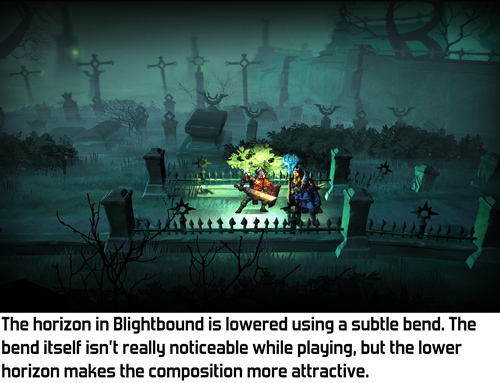
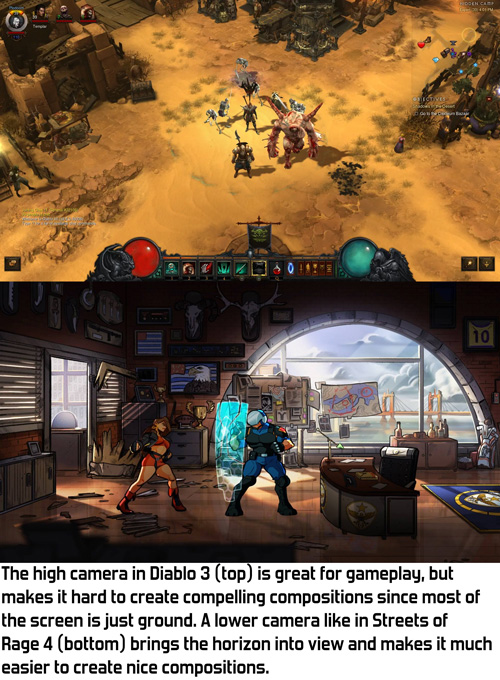
At Ronimo we come from a world of 2D games. In 2D, composition can be whatever you like. That’s why our art director Gijs Hermans may sometimes want to ignore standard perspective rules and instead looks at what he wants to achieve visually. Thus early in development Gijs came to me and said he wanted the camera to look down quite a bit, but still have the horizon in view. In fact, he wanted the horizon to be quite a bit below the top of the screen. His reasoning was that visuals look much better when you don’t see just the floor most of the time. Het position of the horizon is an important tool for shaping a composition.

The origin of this request is a clash that often happens in game development: pretty visuals versus gameplay clarity. Our artists spend a lot of time on achieving both goals simultaneously. A very successful example of this is the way gameplay objects and backgrounds are drawn in a different style in our previous game Swords & Soldiers 2, as I described in this blogpost.

In a game where depth matters, like Blightbound, a low camera is problematic because it makes it difficult to see whether you are standing in front of an enemy or behind them. A high camera solves this, but a high camera removes the horizon from view, making the image a lot more boring.
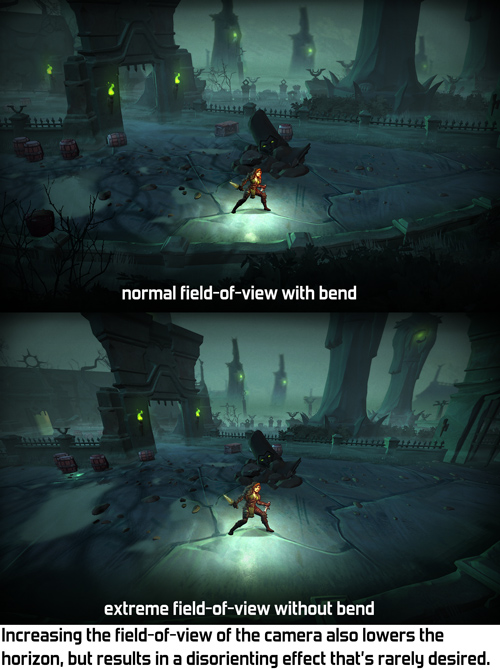
When Gijs came to me with this request, I thought of two possible solutions: either give the camera a wider field-of-view, or bend the world to move the horizon down. We tried the easiest solution first: wide field-of-view. However, it turned out this needed to be set so wide that the entire perspective looked skewed. Extreme field-of-view often isn’t very pretty and it definitely wasn't in Blightbound.
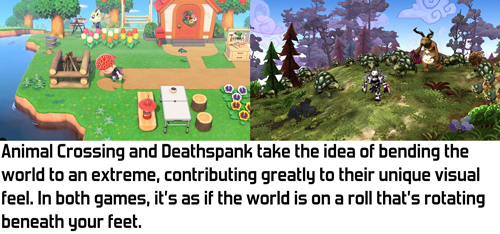
The alternative I came up with is bending the world down the further it is from the camera. This is an effect that’s used in a bunch of games to create a sense that the world is very small, making the world feel cutesy and funny. However, Blightbound is intended to be a dark fantasy game, definitely not something cute and funny, so we didn’t want anything that extreme. I figured that with some tweaking it might be possible to achieve a more subtle version of this that still keeps the horizon in view but doesn’t have the funny vibe.
My implementation of this effect is quite simple. In the vertex shader I bend down the world depending on the Z-position of the vertex in the world. The nice thing of implementing it this way is that our gameplay code and level design tools can assume a flat world, making them a lot simpler. The bending only exists during rendering, so gameplay logic doesn't need to take it into account.

A minor challenge in implementing this bend is how to handle lighting and shadows. When the camera moves forward and the world bends, we don’t want the lighting on objects to change, since that would make the bending very obvious and would make the player focus on the backgrounds instead of on the gameplay. Also, objects in the background shouldn't be more bright because they are rotated towards the light by the bend. My solution was to calculate all lighting, shadows and fog as if there is no world bend.

Also, a little technical note: since the bend happens on the vertices, objects need to have enough vertices. A big square plane for the ground with no vertices in between can’t be bent. Occasionally this caused bugs where a small object would float above a big object because the big object didn’t have enough vertices to be bent correctly.

The bend effect is quite fun to see in action when set to an extreme value. However, any kind of geometric deformation is quite noticeable when the camera moves, so we chose to fix the bend in the world instead of letting it move with the camera.


A few different settings for the bend, including the final one used in Blightbound.

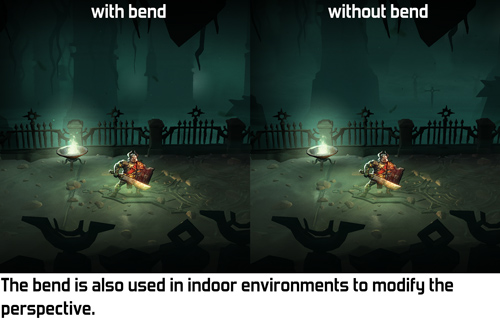
As you can see in the video, the bend effect is kept quite subtle in Blightbound. We didn’t want that cutesy/funny effect at all, since this is intended to be a dark fantasy game. Our level artist Ralph Rademakers tweaked the effect and the camera a lot until he got it to a point where it felt like there was no bend at all, just a natural camera. However, if you compare with and without bend, you can see that the bend makes a huge difference in what you actually see. And that’s exactly how it was intended: achieve the desired composition but don’t make it look like anything weird is going on.
And then came the fog! The bend effect was implemented when we hadn’t figured out the lore of the world yet. We didn’t know then that we would want to have so much fog. In fact, the working title of the game used to be AwesomeKnights instead of Blightbound! Once we finally decided on the lore we knew that the world of Blightbound is covered in “blight”, a corrupting fog. To match that, Ralph added a lot of fog to all the levels. This creates a great atmosphere, but… hides the horizon!

Does that make the world bend useless? No, definitely not. It's still used in quite a few levels to change the perspective and have a more horizontal view on the background, even if we can’t see as far as before. It’s a more subtle tool than originally intended, but still a very useful tool.

I think the bend effect we used here is a wonderful example of the kind of graphics programming I enjoy most: looking at what’s needed from an artistic standpoint, and then making tech that achieves that. I’m personally not very interested in realistic rendering: 3D is just a tool to make cool art, whatever the shape or type. The bend technique used here makes no sense whatsoever from a physical standpoint, but it adds to making Blightbound a prettier, more compelling game.

Saturday, 6 November 2010

Stereoscopic 3D

Stereoscopic 3D has been all the hype of late. You know, with those black shutter glasses and expensive televisions, or on the new Nintendo 3DS. Although I usually totally ignore these kinds of hypes (I don't have an iPhone, for example), I somehow already ended up making two games for 3D: Swords & Soldiers for the Playstation 3 and Proun for the PC. The latter will be playable in 3D in a few weeks at the STRP festival in Eindhoven.

I won't bother you with the technical aspects and the weird camera math of stereoscopic 3D, since I think the implications of stereoscopic 3D for graphics are a lot more interesting and not as straightforward as one might think.

The first thing to realize is that you should really consider the monitor to be a window into another world. Things may come out from this world, through the monitor towards the player, but if this happens, then these objects should not be cut-off by the edges of the screen. If an object is behind the screen in the 3D space, then the viewer's brain easily accepts that it is partially behind the monitor's edge. However, if the object is in front of the screen, yet is cut-off by the edge of the screen, then that is really weird to watch: how can an object be hidden behind something that is further away? This is called a window violation. A design implication of this is that in a first person shooter, the gun cannot be in front of the monitor and thus cannot be really close to the player.


However, it is a lot of fun to have objects fly towards you. This looks so real, that as a player, you will want to duck to evade that coconut that is being thrown at you. So it is a good idea to put some of these effects in the game. Unfortunately, both Proun and Swords & Soldiers lack such effects, because I didn't have the time to add additional special effects just for 3D.

For pure realism, one could argue that the distance between the left and right eye in the game world should be the same as on a real person. However, as a programmer, you have control over this. Moving the virtual eyes further away from each other essentially makes the depth effect stronger. The stronger, the more spectacular, but making it too strong causes headaches.


A difficulty of 3D is that your eyes always focus on the screen, even though your brain thinks you are seeing objects that are behind the screen or in front of it. Because of this difference between your brain and your eyes, switching from where you are looking takes longer for stereo 3D than it does in the real world. Even worse: doing it a lot causes headaches, especially with certain people who are sensitive to this (like myself).


This is especially important to think about for the GUI. For example, in Swords & Soldiers, the healthbars are deliberately placed at the same distance as the soldiers. I would have liked to also position the map and the player's gold at this same distance, but because we also have foreground graphics, I had to place the interface in front of the foreground graphics.


A very cool effect in Swords & Soldiers is that because all the objects are themselves 2D, making the entire scene 3D means that all objects look like cardboard cut-outs. In a normal game that wouldn't be cool, but it works really well with the cartoony art style of Swords & Soldiers and looks awesome!

Finally, stereoscopic 3D means that certain cheap tricks cannot be used any more. Many games create rain by simple placing a rain texture on the screen, instead of having actual rain in the 3D world. With stereoscopic 3D, this trick becomes very obvious, so you need to somehow do better rain.

So, even though it is pretty easy to get 3D to work at all, it definitely takes some extra design work to make a game that works really well with stereoscopic 3D!

Saturday, 30 October 2010

Designing against motion sickness in Proun

Last week Proun was shown on Kotaku and Gametrailers. Most reactions were extremely positive (awesome, woohoo! ^-^ ), but there were also quite a few remarks about people fearing motion sickness when playing the game. I totally agree that this is a serious issue with this kind of game, so I constantly took it into account with a lot of design decisions. I tested Proun on large flocks of people at different occasions and the nice result of my work against nausea is that it is pretty rare for people who actually play Proun to get motion sickness.

The emphasis on the word play in that previous sentence is important: watching someone play the game or, even worse, watching a video montage of it, is actually a lot more nauseating then playing yourself. The reason for this is simple: the camera only rotates when you steer, so when you play yourself, you see the camera movement coming. This really makes a huge difference, so playing the game yourself is a lot better than watching that trailer.

Preventing motion sickness was an important argument for a lot of design decisions in Proun, especially concerning the camera. A great help is that I have designed and coded quite a few camera systems in other games already: De Blob, Swords & Soldiers, Ronimo's secret new game and the cancelled 3D game that we were developing at Ronimo before we made Swords & Soldiers. Those camera systems weren't necessarily great, but at least I learned a lot while programming them!

In general, an important cause for motion sickness is camera smoothing. Without smoothing, camera movement may look very blocky and ugly. However, smoothing also means that the camera does not directly follows the player's movements, since it must add a little bit of delay to smooth things out. I experimented with smoothing a lot for Ronimo's cancelled 3D game, and it turned out that certain types of extreme smoothing cause almost instant nausea, but that even the tiniest bit already has this effect to a small extent. With a lot of smoothing, the camera may never stand still. So for Proun, I chose not to have any camera smoothing at all. I did experiments with it, but all the smoothing schemes I applied caused too much nausea for Proun's own good.

The reason motion sickness is so important for Proun specifically, is that there is no up or down. The camera constantly rotates the world around and there is no horizon to focus your eyes on. Even the cable whooshes and curves by real fast. So I chose to position the player's vehicle at the centre of the screen and to always keep it there, without zooming or looking around it. This way the ball replaces the horizon as the stable factor on the screen.

Proun may still result in motion sickness a bit quicker than other games, but because of the counter-measures I took in the camera design, I think this is solved well enough. Playtesting shows that most people can play this crazy rotating game as well as any other 3D game. :)